
You are using an out of date browser. It may not display this or other websites correctly.
You should upgrade or use an alternative browser.
You should upgrade or use an alternative browser.
REFERENCE Oppo a7 password and frp
- Thread starter tech-boy
- Start date

Mobsol86
Registered
Diko magets thread mo. Cleck version1.2 3x
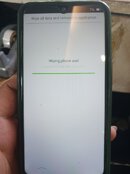
pasok ka sa recovery mode boss,myron ka mkikita doon na android version sa pina ka baba,sorry wla kasi ako pic,Diko magets thread mo. Cleck version1.2 3x

Jomar20
Registered
para sa mga di nagets post ni bossing
1.open unlock tool
2.select oppo a7
3.click edl factory reset
4.sa phone naman, off unit, go to recovery tap english
sa baba makikita mo ver. 1.2, tap nyo lang yan ng maraming beses hanggang lumabas si download mode,
5. pag labas ni download mode salpak cable na then wait n lang
6.dial *#813# ....... DONE
1.open unlock tool
2.select oppo a7
3.click edl factory reset
4.sa phone naman, off unit, go to recovery tap english
sa baba makikita mo ver. 1.2, tap nyo lang yan ng maraming beses hanggang lumabas si download mode,
5. pag labas ni download mode salpak cable na then wait n lang
6.dial *#813# ....... DONE

Rain_Drops
Registered
salamat sa tips master.. tested 100%

artzaivin
Registered
same lng sa a3s
Who read this thread
(Total readers: 15)