
- Joined
- Apr 21, 2016
- Messages
- 1,439
- Reaction score
- 309
- Points
- 181
- Location
- Cabadbaran City Agusan Del Norte
Run mrt
Oppo
Select model *A3
Tick Format(unlock)
Click start
Hold vol up&down (Naka Off)
Insert cable
Hintayin ang *all is done
Sa Frp naman dial lang *#813# (Emergency call)
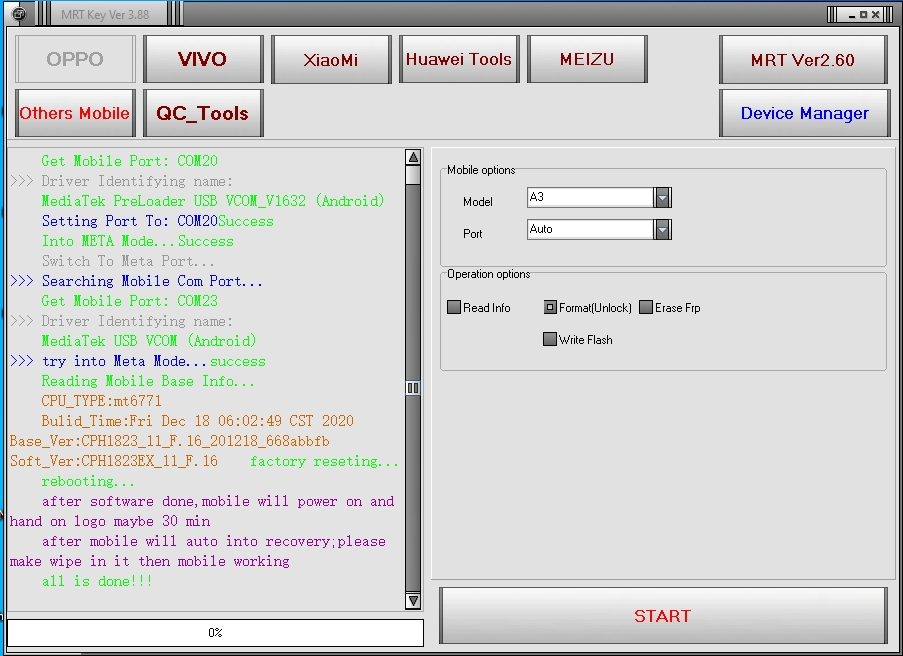
Oppo
Select model *A3
Tick Format(unlock)
Click start
Hold vol up&down (Naka Off)
Insert cable
Hintayin ang *all is done
Sa Frp naman dial lang *#813# (Emergency call)
>>> Searching Mobile Com Port...
Get Mobile Port: COM20
>>> Driver Identifying name:
MediaTek PreLoader USB VCOM_V1632 (Android)
Setting Port To: COM20Success
Into META Mode...Success
Switch To Meta Port...
>>> Searching Mobile Com Port...
Get Mobile Port: COM23
>>> Driver Identifying name:
MediaTek USB VCOM (Android)
>>> try into Meta Mode...success
Reading Mobile Base Info...
CPU_TYPE:mt6771
Bulid_Time:Fri Dec 18 06:02:49 CST 2020 Base_Ver:CPH1823_11_F.16_201218_668abbfb Soft_Ver:CPH1823EX_11_F.16 factory reseting...
rebooting...
after software done,mobile will power on and hand on logo maybe 30 min
after mobile will auto into recovery;please make wipe in it then mobile working
all is done!!!


