What's new
PinoyTechnician

This is a sample guest message. Register a free account today to become a member! Once signed in, you'll be able to participate on this site by adding your own topics and posts, as well as connect with other members through your own private inbox!

DOWNLOAD OPPO R7 Plus stock rom

sotonil

Registered
Joined
Nov 5, 2014
Messages
1,292
Reaction score
81
Points
181
Location
fitmart mall of general santos city. daproza st.
OPPO R7 Plus stock rom

201509080909350xjU5nT8WGV1H9MM.png


Download Latest

ColorOS Virsioan

download linkz...http://downloads.oppo.com.s3.amazonaws.com/firmware/R7plusf/R7plusfEX_11_OTA_012_all_201512251816.zip

gudlock po mga boss...{} {} {} {} {}
 
Last edited by a moderator:
using sd card gamit nyan boss..

may nakapagpost na ng picture sa ka-ant natin boss..

malinaw at maliwanag po ang post nya..

galing po kay boss edy sy...

sayng via recovery flashing dn pla itong firmware mo bos,,ayw na kc pumasok sa recovery ung sakn eh,,anyway tnx po sa pgshare
 
Flash Oppo R7 Plus

ito boss..try mo ito

baka mag soccess yan dito..

How To Flash Oppo R7 Plus

1 If you want to flash your Oppo R7 Plus follow the link to download the Flashtool software as your very first step

2 When the download is completed install Flashtool.exe file in your computer.

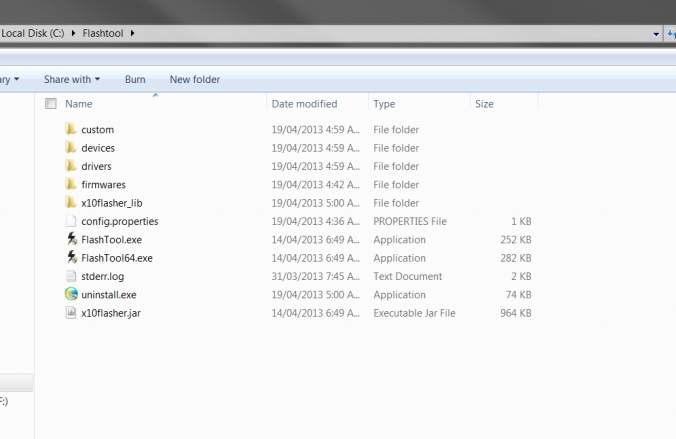
3 Congratulations, you have installed Flashtool successfully. Now, follow the picture here and browse for the folder where Flashtool is installed.

Flash%2B1.jpg


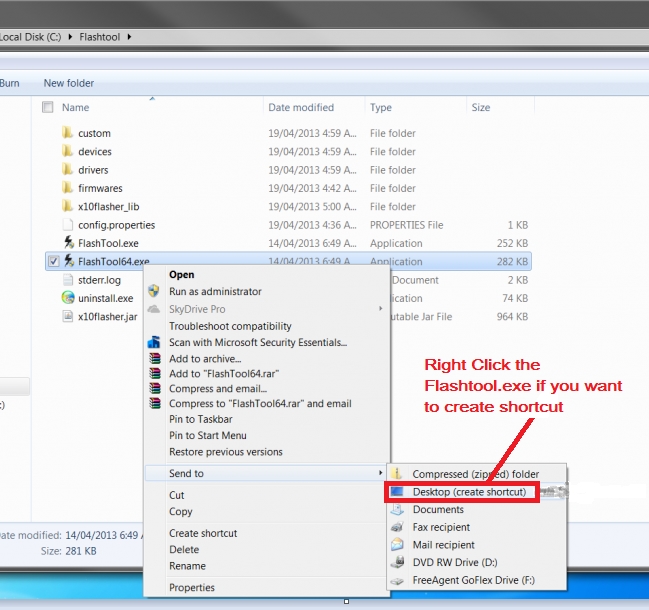
4. Check this line only if you wish to keep shortcut on Desktop screen.

Flash%2B2.jpg


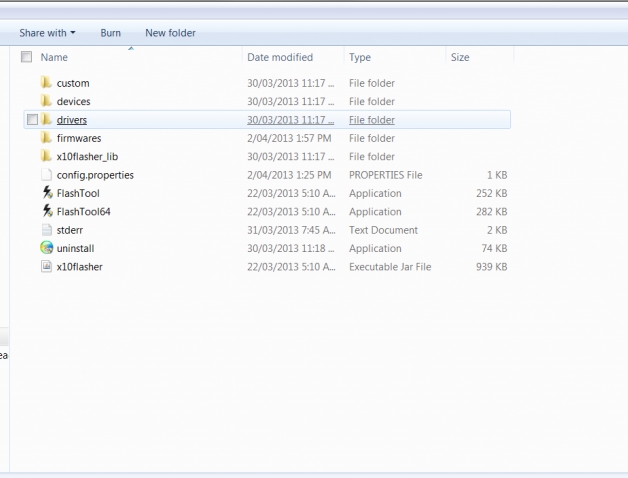
5. This is a very sensitive step, so follow this picture correctly and install the driver for Oppo R7 Plus in your computer.

Flash%2B3.jpg


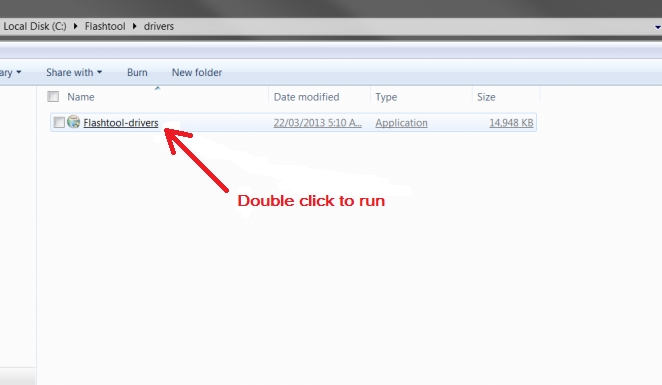
6. Now download the latest ROM for Oppo R7 Plus as it is required to flash your Oppo R7 Plus. Click on the link below to Download ROM

Flash%2B4.jpg


7. All done, now the step comes for finalizing your flash operation. Open Flashtool, select the ROM [downloaded file] and press the start button. It will take
not more than 2 minutes only.
Here it is, your Oppo R7 Plus that is completely flashed just now.

(Flash Tool + ROM)..http://getmyfile.org/file/0571EC

(Flash Tool + ROM)..http://surefile.org/file/0571EC

gudlock po mga boss...{} {} {} {}
 
ito boss..try mo ito

baka mag soccess yan dito..

How To Flash Oppo R7 Plus

1 If you want to flash your Oppo R7 Plus follow the link to download the Flashtool software as your very first step

2 When the download is completed install Flashtool.exe file in your computer.

3 Congratulations, you have installed Flashtool successfully. Now, follow the picture here and browse for the folder where Flashtool is installed.

Flash%2B1.jpg


4. Check this line only if you wish to keep shortcut on Desktop screen.

Flash%2B2.jpg


5. This is a very sensitive step, so follow this picture correctly and install the driver for Oppo R7 Plus in your computer.

Flash%2B3.jpg


6. Now download the latest ROM for Oppo R7 Plus as it is required to flash your Oppo R7 Plus. Click on the link below to Download ROM

Flash%2B4.jpg


7. All done, now the step comes for finalizing your flash operation. Open Flashtool, select the ROM [downloaded file] and press the start button. It will take
not more than 2 minutes only.
Here it is, your Oppo R7 Plus that is completely flashed just now.

(Flash Tool + ROM)..http://getmyfile.org/file/0571EC

(Flash Tool + ROM)..http://surefile.org/file/0571EC

gudlock po mga boss...{} {} {} {}

ngayong arw ntu try ko ito kng ma done po promise po feedback kita agad sayo 1rst in our furom pa ito :) sna mg done :D
 
Back
Top