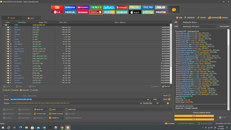
procedure taken :
open unlock tool
go to qualcom tab
Click Custom
load files ( prog_emmc_firehose_8953_ddr.mbn )
LOad firm ware type
click Flash
power off unit
hold Vol+ Vol-
done buhay n ulit c unit
eto yung files
https://mega.nz/file/DrpkjZ5R#eI4xtkjDHB1SlfTWYnMzBYLdOx98Xy9psyWGd6f1GyA
1. Download Stock Rom and extract it.
2. Run Unlock Tool.
3. Choose Qualcomm Snapdragon / Flash / Custom / Firmware / Firmware Type xml.
4. Find the Stock Rom and select on the folder / [ rawprogram0.xml ]
-The firmware will be loading on the top .
5.On Firehose , choose [ prog_emmc_firehose_8953_ddr.mbn ] .
6. Choose [ Flash ] , then Unlock Tool is waiting for the device.
open unlock tool
go to qualcom tab
Click Custom
load files ( prog_emmc_firehose_8953_ddr.mbn )
LOad firm ware type
click Flash
power off unit
hold Vol+ Vol-
done buhay n ulit c unit
eto yung files
https://mega.nz/file/DrpkjZ5R#eI4xtkjDHB1SlfTWYnMzBYLdOx98Xy9psyWGd6f1GyA
1. Download Stock Rom and extract it.
2. Run Unlock Tool.
3. Choose Qualcomm Snapdragon / Flash / Custom / Firmware / Firmware Type xml.
4. Find the Stock Rom and select on the folder / [ rawprogram0.xml ]
-The firmware will be loading on the top .
5.On Firehose , choose [ prog_emmc_firehose_8953_ddr.mbn ] .
6. Choose [ Flash ] , then Unlock Tool is waiting for the device.