P7300 Galaxy Tab 8.9 Unlock Done
GT-P7300 Galaxy Tab 8.9 Unlock Done
Lock sa "ORANGE"

Tools
1. Octopus Box Samsung
2. USB ng P1000
or baka meron kasamang USB
Procedure : 1
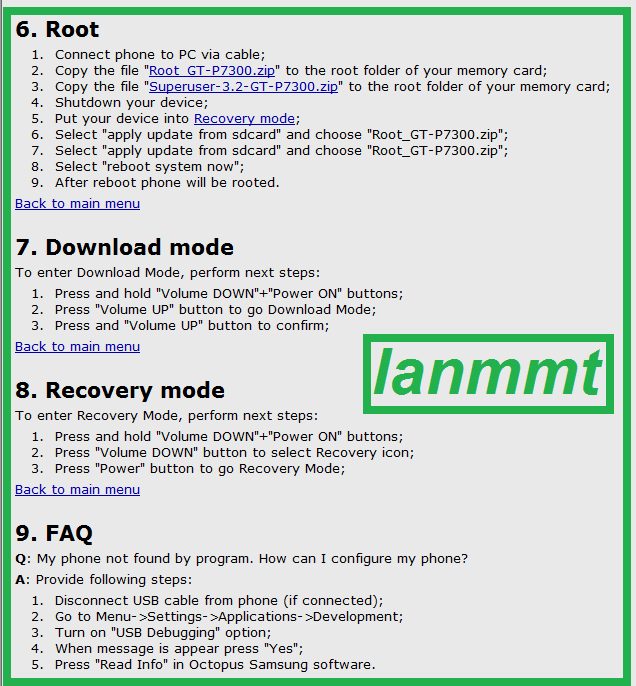
1. Root first (download mona ng root file) makikita rin sa manual, Click lang direct link yung ROOT file
2. How to ROOT (makikita rin sa manual paano) sundan nalang po yung guide

Procedure :2
-----------------------------------------------------------------------------------
To connect GT-P7300B phone you have to perform the following steps:
1. Disconnect USB cable from phone.
2. Go to Menu->Settings->Applications->Development.
3. Turn on "USB Debugging" option.
4. When the message appears press "Yes".
5. Connect USB cable to the phone.
6. Press "Read Info" in Octopus Samsung software.
Tick UNLOCK

Unlock Done
Code:
------------------------------------------------------------------ To connect GT-P7300 phone you have to perform the following steps: 1. Disconnect USB cable from phone. 2. Go to Menu->Settings->Applications->Development. 3. Turn on "USB Debugging" option. 4. When the message appears press "Yes". 5. Connect USB cable to the phone. 6. Press "Read Info" in Octopus Samsung software. ------------------------------------------------------------------ Platform: Samsung Android Selected port: COM1 Selected model: GT-P7300 Searching for a phone. Please wait... Phone found. Firmware compiled date: Fri Sep 2 16:05:52 KST 2011 Phone IMEI: 35881704033XXX1 Android version: 3.1 (HMJ37) ------------------------------------------------------------------ Platform: Samsung Android Selected port: COM1 Selected model: GT-P7300 Searching for a phone. Please wait... Phone found. Firmware compiled date: Fri Sep 2 16:05:52 KST 2011 Phone IMEI: 35881704033XXX1 Android version: 3.1 (HMJ37) Unlocking phone... Unlocking phone. It can take some time. Please wait... Phone will restart now Phone is successfully unlocked ------------------------------------------------------------------

GT-P7300 Galaxy Tab 8.9 Unlock Done
Lock sa "ORANGE"
Tools
1. Octopus Box Samsung
2. USB ng P1000
or baka meron kasamang USB
Procedure : 1
1. Root first (download mona ng root file) makikita rin sa manual, Click lang direct link yung ROOT file
2. How to ROOT (makikita rin sa manual paano) sundan nalang po yung guide
Procedure :2
-----------------------------------------------------------------------------------
To connect GT-P7300B phone you have to perform the following steps:
1. Disconnect USB cable from phone.
2. Go to Menu->Settings->Applications->Development.
3. Turn on "USB Debugging" option.
4. When the message appears press "Yes".
5. Connect USB cable to the phone.
6. Press "Read Info" in Octopus Samsung software.
Tick UNLOCK
Unlock Done
Code:
------------------------------------------------------------------ To connect GT-P7300 phone you have to perform the following steps: 1. Disconnect USB cable from phone. 2. Go to Menu->Settings->Applications->Development. 3. Turn on "USB Debugging" option. 4. When the message appears press "Yes". 5. Connect USB cable to the phone. 6. Press "Read Info" in Octopus Samsung software. ------------------------------------------------------------------ Platform: Samsung Android Selected port: COM1 Selected model: GT-P7300 Searching for a phone. Please wait... Phone found. Firmware compiled date: Fri Sep 2 16:05:52 KST 2011 Phone IMEI: 35881704033XXX1 Android version: 3.1 (HMJ37) ------------------------------------------------------------------ Platform: Samsung Android Selected port: COM1 Selected model: GT-P7300 Searching for a phone. Please wait... Phone found. Firmware compiled date: Fri Sep 2 16:05:52 KST 2011 Phone IMEI: 35881704033XXX1 Android version: 3.1 (HMJ37) Unlocking phone... Unlocking phone. It can take some time. Please wait... Phone will restart now Phone is successfully unlocked ------------------------------------------------------------------