
- Joined
- Jan 16, 2019
- Messages
- 229
- Reaction score
- 180
- Points
- 21
- Location
- POBLACION 8 MAMBURAO OCC MINDORO
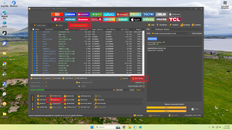
1. Open UT
2. Go to Mediatek
3. Go to MTK UNIVRESAL
4. Click BOOT DEVICE
5. Off Unit
6. Hold Volume up and down din plug unit
7. Hintayin lang mag ok at ma read lahat ng partition
8. Click Erase FRP
2. Go to Mediatek
3. Go to MTK UNIVRESAL
4. Click BOOT DEVICE
5. Off Unit
6. Hold Volume up and down din plug unit
7. Hintayin lang mag ok at ma read lahat ng partition
8. Click Erase FRP
Attachments
Last edited: