
Redmi Note 5A frp remove
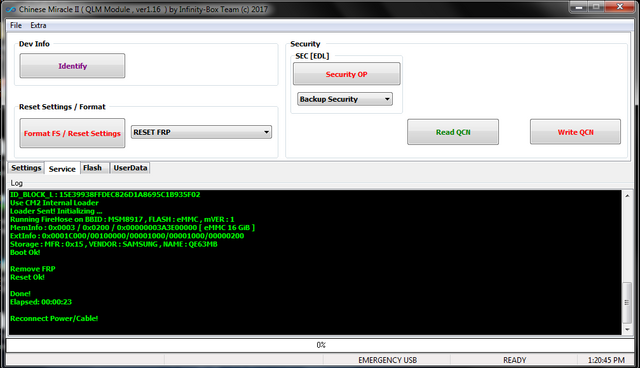
1. Power Off Phone , Remove battery , Insert back
2. PRESS and HOLD BOTH VOLUME KEYS!
3. Insert USB cable. In some cases require use EDL cable or TP to force EDL mode!
Wait for phone...
Device Found!
Initialize ...
Handshake passed!
ID_BLOCK_I : SnapDragon 425 [MSM8917]
ID_BLOCK_S : 3E4B1DAC
ID_BLOCK_L : A2EF7C5AE2E1D78A0B5DEB5ACEBC5C73
ID_BLOCK_L : 15E39938FFDEC826D1A8695C1B935F02
Use CM2 Internal Loader
Loader Sent! Initializing ...
Running FireHose on BBID : MSM8917 , FLASH : eMMC , mVER : 1
MemInfo : 0x0003 / 0x0200 / 0x00000003A3E00000 [ eMMC 16 GiB ]
ExtInfo : 0x0001C000/00100000/00001000/00001000/00000200
Storage : MFR : 0x15 , VENDOR : SAMSUNG , NAME : QE63MB
Boot Ok!
Remove FRP
Reset Ok!
Done!
Elapsed: 00:00:23
Reconnect Power/Cable!
1. Power Off Phone , Remove battery , Insert back
2. PRESS and HOLD BOTH VOLUME KEYS!
3. Insert USB cable. In some cases require use EDL cable or TP to force EDL mode!
Wait for phone...
Device Found!
Initialize ...
Handshake passed!
ID_BLOCK_I : SnapDragon 425 [MSM8917]
ID_BLOCK_S : 3E4B1DAC
ID_BLOCK_L : A2EF7C5AE2E1D78A0B5DEB5ACEBC5C73
ID_BLOCK_L : 15E39938FFDEC826D1A8695C1B935F02
Use CM2 Internal Loader
Loader Sent! Initializing ...
Running FireHose on BBID : MSM8917 , FLASH : eMMC , mVER : 1
MemInfo : 0x0003 / 0x0200 / 0x00000003A3E00000 [ eMMC 16 GiB ]
ExtInfo : 0x0001C000/00100000/00001000/00001000/00000200
Storage : MFR : 0x15 , VENDOR : SAMSUNG , NAME : QE63MB
Boot Ok!
Remove FRP
Reset Ok!
Done!
Elapsed: 00:00:23
Reconnect Power/Cable!