
- Joined
- Feb 23, 2015
- Messages
- 1,961
- Reaction score
- 6
- Points
- 181
S5560 stuck on GT-S5560 logo done by flashing
Tools;
Z3X Samsung
CA-101 cable
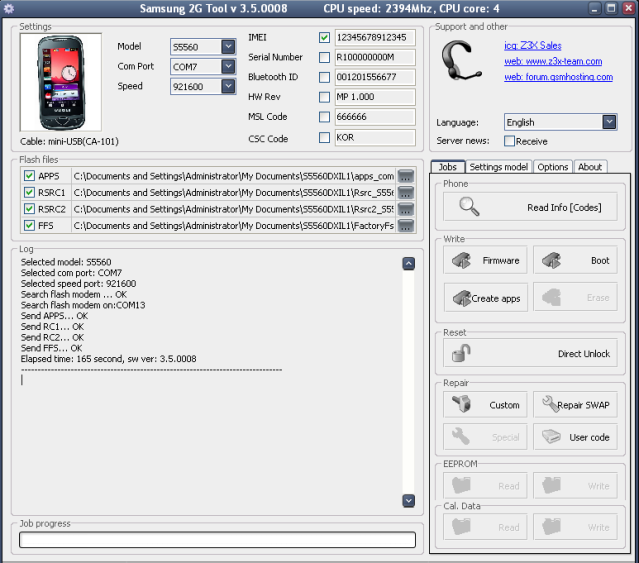
1. Select Phone Model
2. Select COM Port
3. Press Volume Down and Power Button for Download mode
4. Connect USB to Phone
5. Install Samsung USB driver if needed
6. Input Correct Firmware
APPS
RC1
RC2
FFS
7. Click Firmware Button
Download USB Driver HERE
Download Firmware HERE
Thanks
Tools;
Z3X Samsung
CA-101 cable
1. Select Phone Model
2. Select COM Port
3. Press Volume Down and Power Button for Download mode
4. Connect USB to Phone
5. Install Samsung USB driver if needed
6. Input Correct Firmware
APPS
RC1
RC2
FFS
7. Click Firmware Button
Download USB Driver HERE
Download Firmware HERE
Thanks
