What's new
PinoyTechnician

This is a sample guest message. Register a free account today to become a member! Once signed in, you'll be able to participate on this site by adding your own topics and posts, as well as connect with other members through your own private inbox!

DOWNLOAD SAMFW FRP TOOL UPDATES

FredzyNoy

Premium Account
Joined
Apr 9, 2018
Messages
1,771
Reaction score
3,415
Points
741
Location
845 m.de la fuente st.sampaloc,manila
credit sa dev ng tool at uploader

https://samfw.com/blog/samfw-frp-tool-1-0-remove-samsung-frp-one-click

Link download:

V2.0:
https://www.androidfilehost.com/?fid=14655340768118476914

MD5: 669e53d72dcdea56ca702ee39a142f87

Author: Tungtata

Thank you @nguyentuan.kiet.7583 for your commands

Main function:

Remove FRP with one click
Change CSC with one click (beta)
Remove FRP with one click

power on phone
Connect the phone to the PC, and install the Samsung driver if you have not yet installed
Go to emergency call then type *#0*#
Click Remove FRP on the Tool
Click Accept USB debugging on the phone if it appears
The phone will finish and reboot after removing FRP


samfw frp tool 2022 v2.3

https://androidfilehost.com/?fid=14655340768118479959

Main function:

Remove FRP with one click
Change CSC with one click (beta)
Remove FRP with one click

Connect the phone to the PC, and install the Samsung driver if you have not yet installed
Go to emergency call then type *#0*#
Click Remove FRP on the Tool
Click Accept USB debugging on the phone if it appears
The phone will finish and reboot after removing FRP

Fix AT USB Connection
- Important update: Fix FRP Remove/Factory Reset/Disable Knox for new model and old PC. Please update asap!
- Update Factory Reset full automate
 
https://androidfilehost.com/?fid=15664248565197178514

Update v2.6 7/6/2022

- Add reboot Binary mode (Download mode 0)
- Add read information in Download mode
- Add FRP Remove old Android 5/6
- Add Remove bloatware Samsung
- Optimize Reset Download mode
- Optimize Factory Reset
- Fix load libraries problem

6lDs4n6.jpg
 
samfw frp tool 2.7.1
https://androidfilehost.com/?fid=15664248565197180587

SamFw FRP Tool 2.7.1
- Add ADB Battery information
- Add Odin Flash
- Add ADB reboot/reboot download mode/reboot recovery mode
- Add show COM number on device list
- Add Farsi (Iran) fa-rIR language code
- Add disable driver signature status check
- Add List supported CSC check
- Fix loading progress
- Fix Read info Download mode
- Optimize: Auto detect MTP/Download mode when Read info/Reboot


El4Q0gj.jpg

5f0gZvb.jpg

MvK4X4n.jpg

u73VkLq.jpg

ipHpxtz.jpg
 
Hi

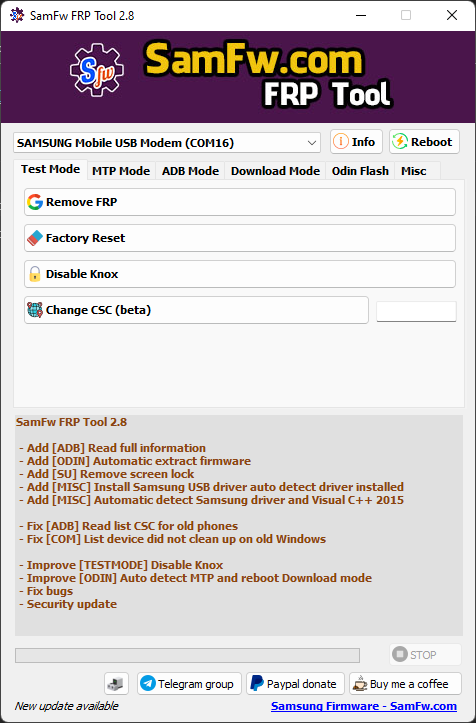
Today, we introducing SamFw FRP Tool version 2.8

Link download:


V2.8: https://www.androidfilehost.com/?fid=15664248565197182401


Main function:

  1. Remove FRP with one click
  2. Change CSC with one click (beta)
Remove FRP with one click

  1. Connect the phone to the PC, and install the Samsung driver if you have not yet installed
  2. Go to emergency call then type *#0*#
  3. Click Remove FRP on the Tool
  4. Click Accept USB debugging on the phone if it appears
  5. The phone will finish and reboot after removing FRP
Update v2.8 20/6/2022

- Add [ADB] Read full information
- Add [ODIN] Automatic extract firmware
- Add [SU] Remove screen lock
- Add [MISC] Install Samsung USB driver auto detect driver installed
- Add [MISC] Automatic detect Samsung driver and Visual C++ 2015

- Fix [ADB] Read list CSC for old phones
- Fix [COM] List device did not clean up on old Windows

- Improve [TESTMODE] Disable Knox
- Improve [ODIN] Auto detect MTP and reboot Download mode
- Fix bugs
- Security update


dodMymf.png
 
Last edited:
3.0 credit lage sa dev at uploader
https://androidfilehost.com/?fid=15664248565197188360

source:
https://samfw.com/blog/samfw-frp-tool-1-0-remove-samsung-frp-one-click

Big Update v.3.0 12/7/2022

- Add [MTP] Enable secret code (*#06#, *#0*#,...) for Verizon phone
- Add [TestMode] Disable Factory mode
- Fix [MTP] Read information: show FAIL on some device
- Fix [DLM] Read information: a small error
- Improve [TestMode] Change CSC
- Improve [ADB] Get list supported CSC: Support S22 series
- Improve [ADB] Check SU
- Improve [ADB] Disable/Enable OTA: Update for more variant
- Improve [ADB] Delete bloatware: Add some Verizon bloatware
- Fix bugs
- Security update
List of functions
Test mode (*#0*#)

  • Remove FRP
  • Factory reset
  • Disable Knox
  • Change CSC (This function works to change to CSC in the supported CSC list. Please use [ADB] - Get list supported CSC for detail)
MTP mode

  • Open browser
  • Factory reset
ADB mode

  • Read full information (includes root checker)
  • Disable OTA update
  • ADB FRP (old and new method)
  • Remove Samsung account (This function works to remove the account in Settings only, not supporting locked state)
  • Delete bloatware (For Korean, Japan, and US variants)
  • Battery information
  • Get list supported CSC (For [TEST MODE] Change CSC)
  • Remove screen lock (Root)
  • Set language
Download mode

  • Exit Download mode
  • Soft brick Fix
  • FRP Android 5/6 (support some models. If you see an error when trying, that means your device is not supported)
Odin Flash

  • Save recent flash files
  • Auto-detect file and select slot
  • Auto-extract for ZIP file
  • Ignore MD5 checksum
Misc

  • Check Driver signature enforcement status
  • Disable/Enable Driver signature enforcement
  • Install Samsung USB driver
  • Install VC++ 2015 (for ADB works)
Reboot

  • MTP Reboot System
  • MTP Reboot Download mode
  • MTP Reboot Binary mode
  • ADB Reboot System
  • ADB Reboot Download mode
  • ADB Reboot Recovery mode
  • ADB Power off
Read info

  • Read information on MTP mode
  • Read information on Download mode
Upcoming function

  • Install XAPK direct
  • Install any apps for Samsung dual message
  • Disable Factory mode
  • [ROOT] Change SN
  • [ROOT] Change battery cycle
  • [ROOT] View saved wifi password
 
Last edited:
samfw frp tool v4.0 credit lage sa mga developer
link 1
https://www.mediafire.com/file/wn5rtdrbs9q64s5/SamFw_Tool_v4.0.zip/file

link 2
https://androidfilehost.com/?fid=4279422670115716655

List of functions
Samsung
Test mode (*#0*#)

Remove FRP
Remove FRP new security
Factory reset
Disable Knox
Disable Factory mode
MTP mode

Factory reset
Enable secret code for Verizon
ADB mode

Change CSC
Remove Samsung account (This function works to remove the account in Settings only, not supporting locked state)
Enable Toggle mobile data (for some AT&T phone)
Download mode

Exit Download mode
Soft brick Fix
FRP Android 5/6 (support some models. If you see an error when trying, that means your device is not supported)
Odin Flash

Save recent flash files
Auto-detect file and select slot
Auto-extract for ZIP file
Ignore MD5 checksum
Misc

Check Driver signature enforcement status
Disable/Enable Driver signature enforcement
Install Samsung USB driver
Install VC++ 2015 (for ADB works)
Xiaomi
ADB

Bypass Micloud Android 8.1
Enable Diag [ROOT]
Fastboot

[UNLOCKED] Remove FRP
Sideload

Factory reset
Remove FRP
Reset Micloud
[QUALCOMM] Bypass Micloud clock (Anti relock)
[QUALCOMM] Remove bypass Micloud clock (Anti relock)
Read offline Micloud information
LG
MTP

Factory reset
EDL (Support LG G7, G8, G8X, G8S, V30, V40, V50, V50S)

Factory reset
Remove FRP
Android
ADB

Battery information
Disable/Enable OTA Update
Set language
Factory reset
FRP

Open Browser (FRP)
Remove FRP
APP Manager

Install APK/xAPK
Install any app on Dual Messenger
Delete bloatware (For Korean, Japan, and US variants)
ROOT

Remove screen lock (Root)
Upcoming function

Install XAPK direct
Install any apps for Samsung dual message
Disable Factory mode
[ROOT] Change SN
[ROOT] Change battery cycle
[ROOT] View saved wifi password
MTK module
Xiaomi sideload solution
9WtLIcu.jpg

9WtLIcu.jpg

kgLvG2J.jpg
 
Last edited:
v4.1 credit to dev
https://androidfilehost.com/?fid=4279422670115720872

List of functions
Samsung
Test mode (*#0*#)

Remove FRP
Remove FRP new security
Factory reset
Disable Knox
Disable Factory mode
MTP mode

Factory reset
Enable secret code for Verizon
ADB mode

Change CSC
Remove Samsung account (This function works to remove the account in Settings only, not supporting locked state)
Enable Toggle mobile data (for some AT&T phone)
Change CSC root mode
Download mode

Exit Download mode
Soft brick Fix
FRP Android 5/6 (support some models. If you see an error when trying, that means your device is not supported)
Odin Flash

Save recent flash files
Auto-detect file and select slot
Auto-extract for ZIP file
Ignore MD5 checksum
Misc

Check Driver signature enforcement status
Disable/Enable Driver signature enforcement
Install Samsung USB driver
Install VC++ 2015 (for ADB works)
Xiaomi
ADB

Bypass Micloud Android 8.1
Enable Diag [ROOT]
Fastboot

[UNLOCKED] Remove FRP
Sideload

Factory reset
Remove FRP
Reset Micloud
[QUALCOMM] Bypass Micloud clock (Anti relock)
[QUALCOMM] Remove bypass Micloud clock (Anti relock)
Read offline Micloud information
LG
MTP

Factory reset
EDL (Support LG G7, G8, G8X, G8S, V30, V40, V50, V50S, Q6, G5, G6, V20, V35, V60)

Factory reset
Remove FRP
Android
ADB

Battery information
Disable/Enable OTA Update
Set language
Factory reset
Hide Developer options
FRP

Open Browser (FRP)
Remove FRP
APP Manager

Install APK/xAPK
Install any app on Dual Messenger
Delete bloatware (For Korean, Japan, and US variants)
CtYEc1W.jpg

8koDs1l.jpg
 
v4.2 credit lage sa dev ng tool
https://androidfilehost.com/?fid=4279422670115726549
https://www.mediafire.com/file/vgf5hwd3m5g1cex/SamFw_Tool_v4.2.zip/file

List of functions

Samsung

Test mode (*#0*#)

  • Remove FRP
  • Remove FRP new security
  • Factory reset
  • Disable Knox
  • Disable Factory mode
MTP mode

  • Factory reset
  • Enable secret code for Verizon
ADB mode

  • Change CSC
  • Remove Samsung account (This function works to remove the account in Settings only, not supporting locked state)
  • Enable Toggle mobile data (for some AT&T phone)
  • Change CSC root mode
Download mode

  • Exit Download mode
  • Soft brick Fix
  • FRP Android 5/6 (support some models. If you see an error when trying, that means your device is not supported)
Odin Flash

  • Save recent flash files
  • Auto-detect file and select slot
  • Auto-extract for ZIP file
  • Ignore MD5 checksum
Misc

  • Check Driver signature enforcement status
  • Disable/Enable Driver signature enforcement
  • Install Samsung USB driver
  • Install VC++ 2015 (for ADB works)

Xiaomi​

ADB

  • Bypass Micloud Android 8.1
  • Enable Diag [ROOT]
Fastboot

  • [UNLOCKED] Remove FRP
Sideload

  • Factory reset
  • Remove FRP
  • Reset Micloud
  • [QUALCOMM] Bypass Micloud clock (Anti relock)
  • [QUALCOMM] Remove bypass Micloud clock (Anti relock)
  • Read offline Micloud information

LG​

MTP

  • Factory reset
EDL (Support LG G7, G8, G8X, G8S, V30, V40, V50, V50S, Q6, G5, G6, V20, V35, V60)

  • Factory reset
  • Remove FRP
LG UP

  • Flash LG KDZ

Android

ADB

  • Battery information
  • Disable/Enable OTA Update
  • Set language
  • Factory reset
  • Hide Developer options
FRP

  • Open Browser (FRP)
  • Remove FRP
APP Manager

  • Manager applications, remove, disable, enable, clear data single app, multi apps
  • Install APK/xAPK
  • Install any app on Dual Messenger
  • Delete bloatware (For Korean, Japan, and US variants)
ROOT

  • Remove screen lock (Root)
redmi 10c frp via mi assistant mode sa recovery
redmi 10c frp fixed sideload mode mi assistant mode.jpg
 
Last edited:
Back
Top