Model:
Samsung Galaxy A24 4G SM-A245F
Problem:
Google Account FRP Locked
Tools Needed:
Griffin-Unlocker
Solution:
1. Put device in Download Mode by pressing Volume Up + Volume Down and connect device on your PC. (Device must be turned off)

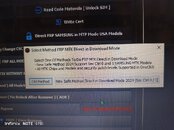
2. Open Griffin-Unlocker and go yo General tab > click SAMSUNG MTK FRP [ Direct in Download Mode ].

3. Wait for the process to finish and your phone will automatically reboot and you’re done!


2. Open Griffin-Unlocker and go yo General tab > click SAMSUNG MTK FRP [ Direct in Download Mode ].
3. Wait for the process to finish and your phone will automatically reboot and you’re done!
Samsung Galaxy A24 SM-A245F Google Account FRP successfully bypassed!
Last edited: