
- Joined
- Feb 8, 2019
- Messages
- 291
- Reaction score
- 233
- Points
- 1
- Location
- Surigao Del Norte. Surigao City
Samsung Galaxy J5 Prime SM-G570Y [Tested]
read/and carefully
How to Remove FRP Samsung Galaxy J5 Prime SM-G570Y.
This time we will discuss how to Remove FRP Samsung Galaxy J5 Prime SM-G570Y easily of course.
Before the execution we discussed a little about the power of the kitchen pacun Samsung Galaxy J5 Prime, this smartphone runs on Android operating system v6.0.1 Marshmallow.
Powered by Quad-core Cortex-A53 processor with speed up to 1.4 GHz and supported 2 GB RAM.
For internal storage alone available 16/32 GB which can be added via microSD reach 256GB.
After discussing jeroannya, here is a guide how to remove frp Samsung Galaxy J5 Prime.
After ADB is active please go to UAT.
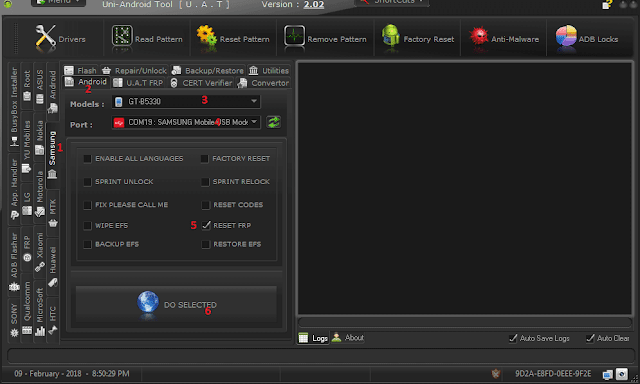
1-Open Samsung
2-Android Tab
3-Select GT-B5330
4-Click " refresh " port will be detected
5-Select "Reset FRP"
6-Click "Do Selected".
read/and carefully
How to Remove FRP Samsung Galaxy J5 Prime SM-G570Y.
This time we will discuss how to Remove FRP Samsung Galaxy J5 Prime SM-G570Y easily of course.
Before the execution we discussed a little about the power of the kitchen pacun Samsung Galaxy J5 Prime, this smartphone runs on Android operating system v6.0.1 Marshmallow.
Powered by Quad-core Cortex-A53 processor with speed up to 1.4 GHz and supported 2 GB RAM.
For internal storage alone available 16/32 GB which can be added via microSD reach 256GB.
After discussing jeroannya, here is a guide how to remove frp Samsung Galaxy J5 Prime.
After ADB is active please go to UAT.
1-Open Samsung
2-Android Tab
3-Select GT-B5330
4-Click " refresh " port will be detected
5-Select "Reset FRP"
6-Click "Do Selected".