
- Joined
- Aug 16, 2017
- Messages
- 20
- Reaction score
- 3
- Points
- 1
UNLOCK INSTRUCTIONS:
Micro-USB cable:
1. Phone must be powered on.
2. Type *#0808# and select 'DM+MODEM+ADB'.
3. Type *#9090# and choose 'DM/DUN over HSIC'.
4. Reboot phone.
Or use 'Activate Diag' function from 'Repair' tab.
5. Connect USB cable, install drivers if needed.
6. Select Samsung diagnostic port in port settings.
7. Press 'Unlock' button for direct unlock.
Done with Samsung Tool PRO v.33.2
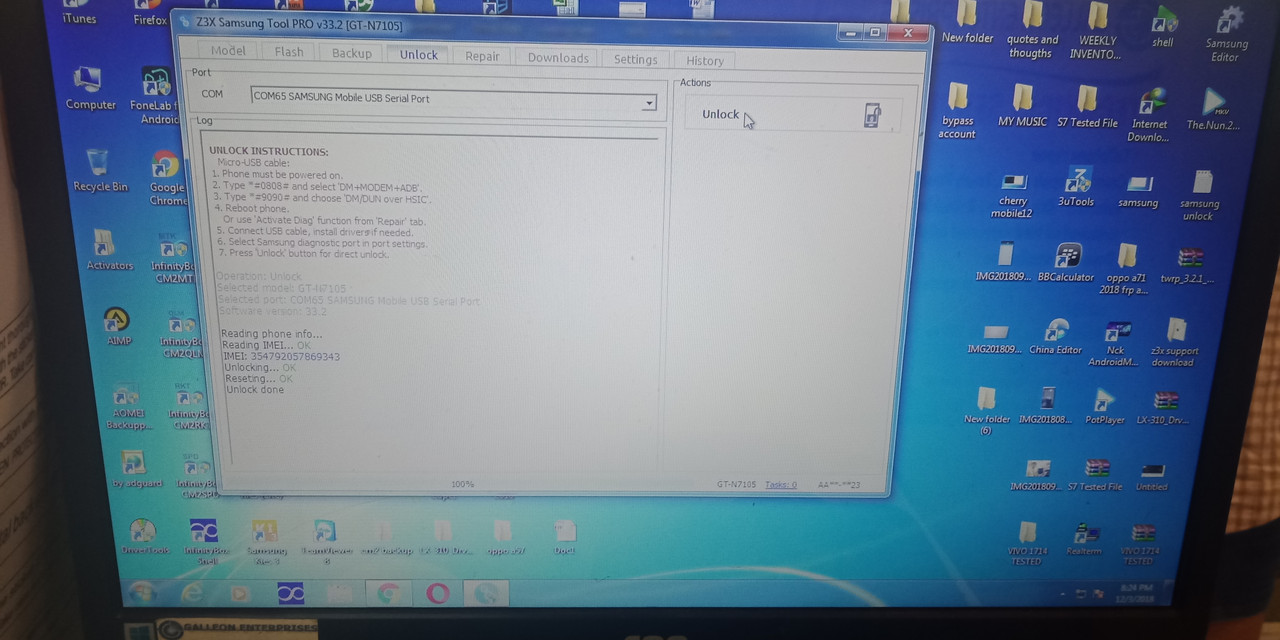
https://i.postimg.cc/fL36wq8v/IMG20181203202517.
DO IT WITH YOUR OWN RISK
TECH: JOB ORDER 24
Micro-USB cable:
1. Phone must be powered on.
2. Type *#0808# and select 'DM+MODEM+ADB'.
3. Type *#9090# and choose 'DM/DUN over HSIC'.
4. Reboot phone.
Or use 'Activate Diag' function from 'Repair' tab.
5. Connect USB cable, install drivers if needed.
6. Select Samsung diagnostic port in port settings.
7. Press 'Unlock' button for direct unlock.
Done with Samsung Tool PRO v.33.2
https://i.postimg.cc/fL36wq8v/IMG20181203202517.
DO IT WITH YOUR OWN RISK
TECH: JOB ORDER 24