J
j4tech
Anonymous
samsung M110s galaxy s upgrade,root and unlock by octopus[Reference]
Samsung Galaxy S - SHW-M110S AnyCall How to upgrade and Root to GingerBread 2.3.5 and unlock by octopus
my phone have security code and i cant hard reset it idont know y so i disided to uprgrade and root it (baka gusto lang akong pahirapan!!! )

Requirements:
Tools
1. Computer
2. USB Cable for Galaxy S(5310 cable mas maikli mas ok!!!)
3. ODIN 1.3
4. ROM (M110S-Gingerbread-HOME-IMAGE-REV03-VJ04-1944-USER.tar)
5. Tegrak-Kernel-Build-26-for-M110S-VG26.tar
6. octopus box activated sa samsung..... for unlocking the phone (PM lang kay UPLINE wapz)
Links to download the requirements:
Gingerbread 2.3.5 ROM (VJ04) : http://translate.google.com/translat...=90126412877 (download 3 file na M110S-Gingerbread-HOME-IMAGE-REV03-VJ04-1944-USER.tar 3 vol... un zip use alzip)
alzip download link
http://www.4shared.com/zip/vnZrnIJG/..._by_tupurr.htm
Tegrak Kernel for VJ04: http://www.4shared.com/file/1OYhkZSI...-for-M11.html?
Instructions:
make sure use short cable (like ca-101d 5310 cable)
itry use long cable have problem on connecting sample pic samsung galaxy on the back of my computer use main USB port...

FLASHING
1. Do not Run Kies( install all driver)
2. Download VJ04, Odin 1.3 and Kernel (just use alzip para ma unzip nyo yung file)
3. Do not plug-in any flash drive etc on the computer, only the device.
4. Backup all the files, contact etc to your computer(its up to you)
5. Turn off Galaxy S (m110s)
6. Press On and Home Button at the same time to access download mode (yellow triangle yun na nandoon si Mighty Android )
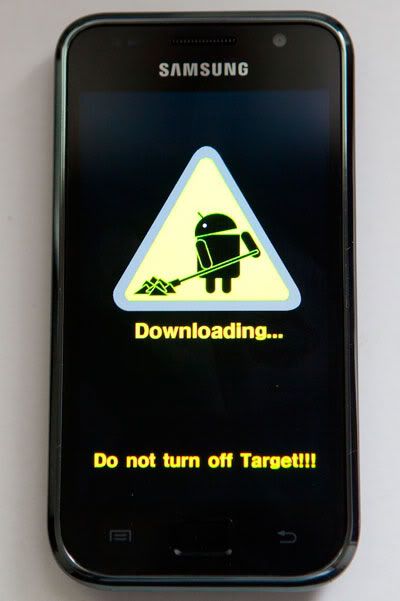
7. Open ODIN and connect the Galaxy S to the PC (Wait for the Yellow Mark "Ex. [COM:34]"
8. Tick the box beside PDA Button and click the PDA button also
9. Locate the VJ04 (kung saan nyo isinave ang file)
10. Click the Start Button and wait until the message on the box says "Pass"
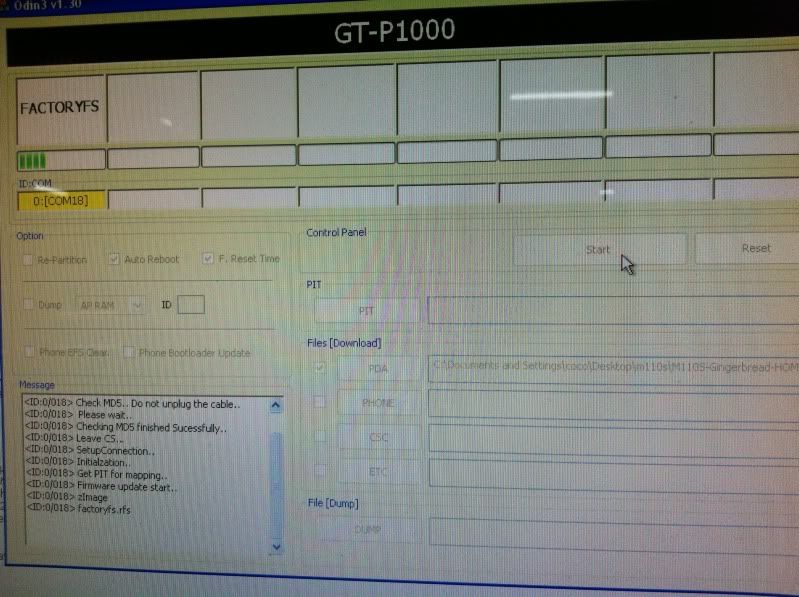
11. Your Device will reboot (medio matagal relax ka lang mabubuhay din yan)
12. Unplug the Device and check the Firmware under "ABOUT PHONE" (sa settings)
13. Finish Flashing
LAGFIXING (halos same lang din po ng gagawin sa flashing)
1. Turn off the Galaxy S
2. Press and Hold the ON/OFF and HOME button again until you see the yellow triangle
3 Run ODIN again and Connect the Device to the USB (Makikita nyo ulit yung yellow mark na may COM
4. Tick again the box beside PDA Button and click the PDA button also
5. Locate the Tegrak-Kernel-Build-26-for-M110S-VG26.tar (kung saan nyo ulit sya isinave ang file)
6. Click the Start Button and wait until the message on the box says "Pass"
7. The device will be reboot(Hintay lang ulit)
intayin nyo lang sumasayaw lang ng kendeng kendeng
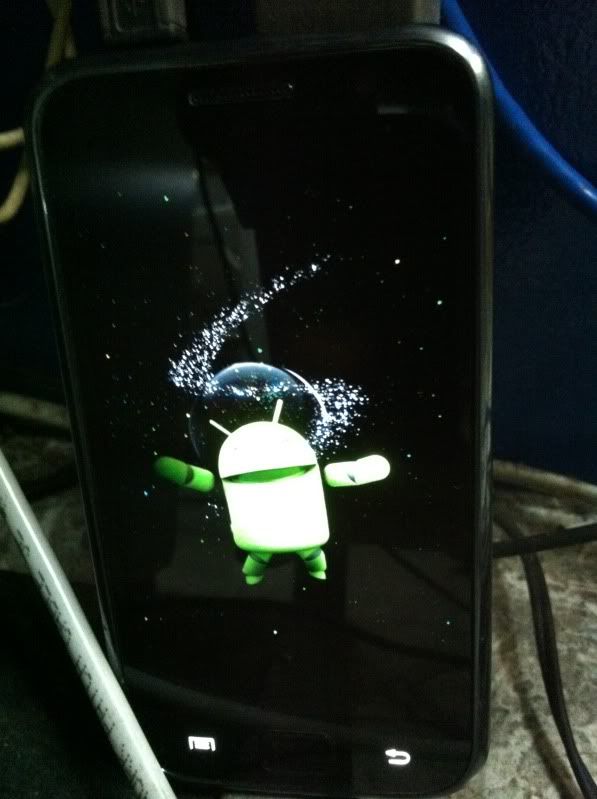
Note: wait lang kayo wait till all done
INSTALL TEGRAK KERNEL
1. Hanap kayo ng wifi spot
2. Access the Android Market and download TEGRAK KERNEL and it will automatically install(make sure you have android market user and pass)
3. Run "TEGRAK KERNEL Application" and "Enable tegrak lagfix (all)"

4 Your Device will reboot again (wait till it say press any key to reboot..)
5. Run "TEGRAK KERNEL Application" again and Enable Rooting

6 reboot and your than....
unlocking mode
unlocking iuse octpous box samsung activated (PM UPLINE wapz)
Provide following steps:
Go to dial window.
Enter "*#7284#" number.
Set "USB" radio button to "Modem" value.
Close window.
Go to dial window.
Enter "*#9090#" number.
Set "Diag config" to "USB" value.
Restart phone.
Press "Read Info" in Octopus Samsung software
1.selec SHW-M110s on the main soft
2.read info
3. read codes

4. read the instruction how to enter the code calculated by the software
5.enter 319712358 on the phone dial box

6.enter 774632
7.select usim setting menu
8.select network personalization
9.succes sighn must appear

10.restart the phone

Samsung Galaxy S - SHW-M110S AnyCall How to upgrade and Root to GingerBread 2.3.5 and unlock by octopus
my phone have security code and i cant hard reset it idont know y so i disided to uprgrade and root it (baka gusto lang akong pahirapan!!! )
Requirements:
Tools
1. Computer
2. USB Cable for Galaxy S(5310 cable mas maikli mas ok!!!)
3. ODIN 1.3
4. ROM (M110S-Gingerbread-HOME-IMAGE-REV03-VJ04-1944-USER.tar)
5. Tegrak-Kernel-Build-26-for-M110S-VG26.tar
6. octopus box activated sa samsung..... for unlocking the phone (PM lang kay UPLINE wapz)
Links to download the requirements:
Gingerbread 2.3.5 ROM (VJ04) : http://translate.google.com/translat...=90126412877 (download 3 file na M110S-Gingerbread-HOME-IMAGE-REV03-VJ04-1944-USER.tar 3 vol... un zip use alzip)
alzip download link
http://www.4shared.com/zip/vnZrnIJG/..._by_tupurr.htm
Tegrak Kernel for VJ04: http://www.4shared.com/file/1OYhkZSI...-for-M11.html?
Instructions:
make sure use short cable (like ca-101d 5310 cable)
itry use long cable have problem on connecting sample pic samsung galaxy on the back of my computer use main USB port...
FLASHING
1. Do not Run Kies( install all driver)
2. Download VJ04, Odin 1.3 and Kernel (just use alzip para ma unzip nyo yung file)
3. Do not plug-in any flash drive etc on the computer, only the device.
4. Backup all the files, contact etc to your computer(its up to you)
5. Turn off Galaxy S (m110s)
6. Press On and Home Button at the same time to access download mode (yellow triangle yun na nandoon si Mighty Android )
7. Open ODIN and connect the Galaxy S to the PC (Wait for the Yellow Mark "Ex. [COM:34]"
8. Tick the box beside PDA Button and click the PDA button also
9. Locate the VJ04 (kung saan nyo isinave ang file)
10. Click the Start Button and wait until the message on the box says "Pass"
11. Your Device will reboot (medio matagal relax ka lang mabubuhay din yan)
12. Unplug the Device and check the Firmware under "ABOUT PHONE" (sa settings)
13. Finish Flashing
LAGFIXING (halos same lang din po ng gagawin sa flashing)
1. Turn off the Galaxy S
2. Press and Hold the ON/OFF and HOME button again until you see the yellow triangle
3 Run ODIN again and Connect the Device to the USB (Makikita nyo ulit yung yellow mark na may COM
4. Tick again the box beside PDA Button and click the PDA button also
5. Locate the Tegrak-Kernel-Build-26-for-M110S-VG26.tar (kung saan nyo ulit sya isinave ang file)
6. Click the Start Button and wait until the message on the box says "Pass"
7. The device will be reboot(Hintay lang ulit)
intayin nyo lang sumasayaw lang ng kendeng kendeng
Note: wait lang kayo wait till all done
INSTALL TEGRAK KERNEL
1. Hanap kayo ng wifi spot
2. Access the Android Market and download TEGRAK KERNEL and it will automatically install(make sure you have android market user and pass)
3. Run "TEGRAK KERNEL Application" and "Enable tegrak lagfix (all)"
4 Your Device will reboot again (wait till it say press any key to reboot..)
5. Run "TEGRAK KERNEL Application" again and Enable Rooting
6 reboot and your than....
unlocking mode
unlocking iuse octpous box samsung activated (PM UPLINE wapz)
Provide following steps:
Go to dial window.
Enter "*#7284#" number.
Set "USB" radio button to "Modem" value.
Close window.
Go to dial window.
Enter "*#9090#" number.
Set "Diag config" to "USB" value.
Restart phone.
Press "Read Info" in Octopus Samsung software
1.selec SHW-M110s on the main soft
2.read info
3. read codes
4. read the instruction how to enter the code calculated by the software
5.enter 319712358 on the phone dial box
6.enter 774632
7.select usim setting menu
8.select network personalization
9.succes sighn must appear
10.restart the phone