
1st enabled debugging
2nd Follow this one
UNLOCK INSTRUCTIONS:
Micro-USB cable:
1. Phone must be powered on.
2. Type *#0808# and select 'DM+MODEM+ADB'.
3. Reboot phone.
Or use 'Activate Diag' function from 'Repair' tab.
4. Connect USB cable, install drivers if needed.
5. Select Samsung diagnostic port in port settings.
5. Press 'Unlock' button for direct unlock.
6. open z3x
7. click unlock
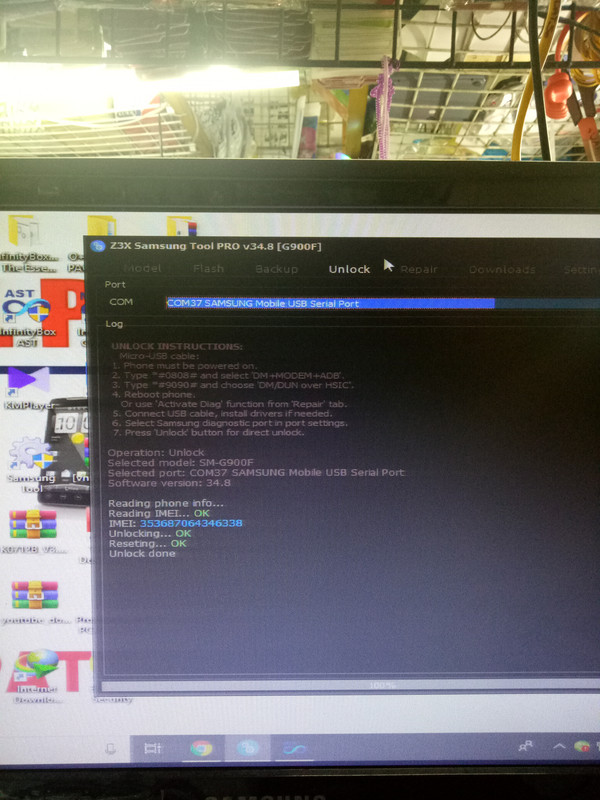
UNLOCK DONE SAGLIT LANG 500
2nd Follow this one
UNLOCK INSTRUCTIONS:
Micro-USB cable:
1. Phone must be powered on.
2. Type *#0808# and select 'DM+MODEM+ADB'.
3. Reboot phone.
Or use 'Activate Diag' function from 'Repair' tab.
4. Connect USB cable, install drivers if needed.
5. Select Samsung diagnostic port in port settings.
5. Press 'Unlock' button for direct unlock.
6. open z3x
7. click unlock
UNLOCK DONE SAGLIT LANG 500
Last edited by a moderator: