
Enable USB DEBUGGING
Root Your Phone First...
i used VROOT...
then
Dial *#0808# on your mobile display
Choose AP and last one DM+MODEM+ADB
Press OK Button (i not detected) Reboot
then
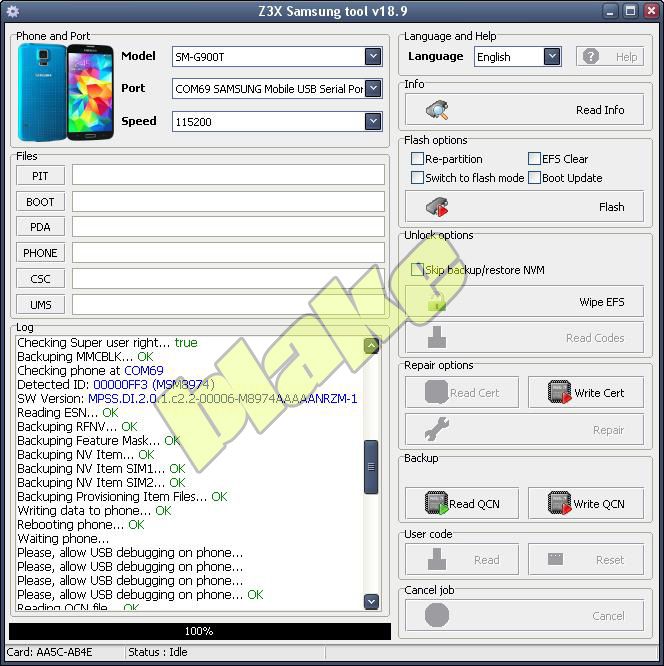
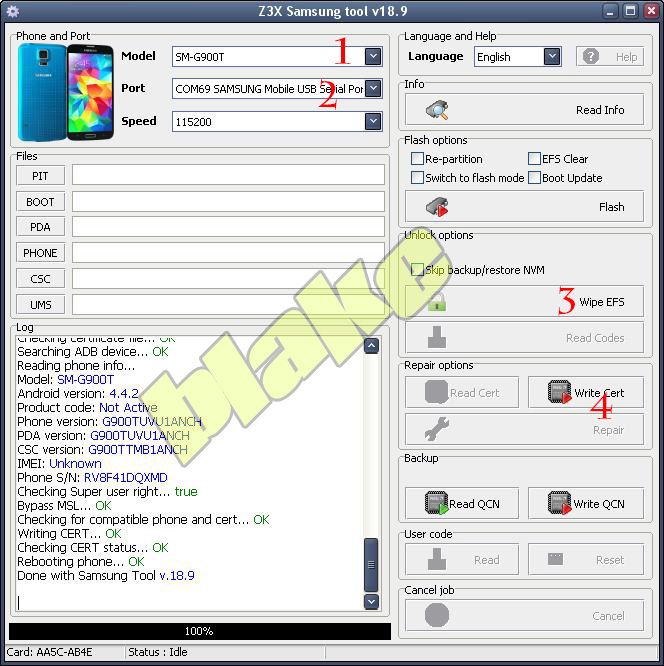
Open Z3x and choose model sm-g900t
Select PORT: Samsung mobile USB serial Port
Click on WIPE EFS button
after Rebooting Phone
Click on Write Cert Button http://www.4shared.com/rar/mi9ZCoOvce/Cert-SM-G900T_352558067456419_.html?
Your Done..

.....
Root Your Phone First...
i used VROOT...
then
Dial *#0808# on your mobile display
Choose AP and last one DM+MODEM+ADB
Press OK Button (i not detected) Reboot
then
Open Z3x and choose model sm-g900t
Select PORT: Samsung mobile USB serial Port
Click on WIPE EFS button
after Rebooting Phone
Click on Write Cert Button http://www.4shared.com/rar/mi9ZCoOvce/Cert-SM-G900T_352558067456419_.html?
Your Done..


.....


