
- Joined
- Nov 5, 2014
- Messages
- 1,292
- Reaction score
- 81
- Points
- 181
share ko lng ito mga boss
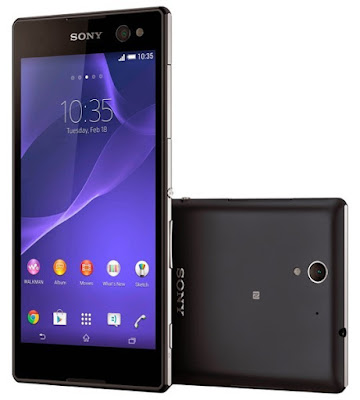
Sony Xperia C3 Dual D2502 Pattern Lock Remove Solution
wala lng akong screnshot..
nagmadali kc c tumer
Step 1 – Download Flashtool
Download Flashtool version 0.9.18.5 (or the latest available) from...http://www.flashtool.net/downloads.php
After downloading above Flashtool, install it.
On opening it, it may ask you to move files stored
in F:\Flashtool\firmwares toF:\Users\PC NAME\.flashTool\firmware (Do move the ftf stored if asked to do so).
Wait then till it syncs the devices list (if it don’t syncs because you are not connected to internet, then leave it. It
is not mandatory to do sync).
Step 2 – Download Firmware Ftf file
Download..http://www.4shared.com/file/5PSINN6Sce/Xperia_C3_Dual_D2502_192A0391_.html?
Step 3 – Put your above download firmware ftf in “F:\Users\PC NAME\.flashTool\firmware†folder
Additional Step :- Install Drivers
Install Drivers from the folder named “Flashtool Drivers†in the location where Flashtool is installed OR just install
PC Companion on your PC and connect your device with it and then remove it.
Step 4 – Open FlashTool
Now Open Flashtool. See the “Black Lightning Thunder icon†at the top left corner. Click on it
http://2.bp.blogspot.com/-EwZtOqzuCko/VYAwrJtuFRI/AAAAAAAAIpI/93x-
GiZQkh8/s640/flash%2Bmode.jpeg
Step 6 – You will now automatically see your download firmware ftf file in the “firmwareâ€
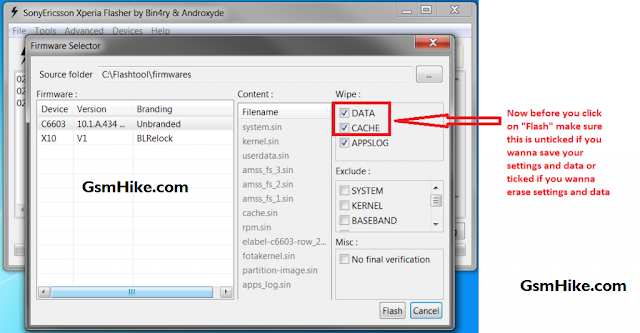
section (left hand side) of Flashtool window. Select your firmware.
Do it: Click on “Flash†button
Step 7 – Preparing files for flashing
After clicking on “Flash†Button in above step, now FlashTool will prepare firmware ftf selected for flashing
Step 9 – Connecting phone in FlashMode
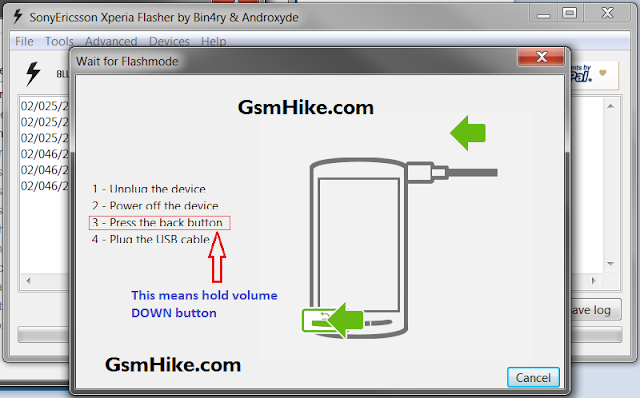
How to do ? Press Volume down button and then insert usb in phone, you will see red and green light blink
once, it means phone is connected in flashmode now.
Here is flash tool...https://doc-14-3g-docs.googleusercontent.com/docs/securesc/ha0ro937gcuc7l7deffksulhg5h7mbp1/6d7dsqvtkjn2ff498g69megg7o6e78qb/1414756800000/08931498268579400494/*/0B6Y08ZJ57MziYXdENE5SUjY5d1k?e=download
Here is Drivers..https://drive.google.com/file/d/0B6Y08ZJ57MziRGszWTFISkN4eUE/view?usp=sharing
ftf pattern lock remove fils..http://www.4shared.com/file/5PSINN6Sce/Xperia_C3_Dual_D2502_192A0391_.html?
{} {} {} {}
pattern lock remove lang yan mga boss
sana makatulong po..:-h :-h :-h
Sony Xperia C3 Dual D2502 Pattern Lock Remove Solution
wala lng akong screnshot..
nagmadali kc c tumer
Step 1 – Download Flashtool
Download Flashtool version 0.9.18.5 (or the latest available) from...http://www.flashtool.net/downloads.php
After downloading above Flashtool, install it.
On opening it, it may ask you to move files stored
in F:\Flashtool\firmwares toF:\Users\PC NAME\.flashTool\firmware (Do move the ftf stored if asked to do so).
Wait then till it syncs the devices list (if it don’t syncs because you are not connected to internet, then leave it. It
is not mandatory to do sync).
Step 2 – Download Firmware Ftf file
Download..http://www.4shared.com/file/5PSINN6Sce/Xperia_C3_Dual_D2502_192A0391_.html?
Step 3 – Put your above download firmware ftf in “F:\Users\PC NAME\.flashTool\firmware†folder
Additional Step :- Install Drivers
Install Drivers from the folder named “Flashtool Drivers†in the location where Flashtool is installed OR just install
PC Companion on your PC and connect your device with it and then remove it.
Step 4 – Open FlashTool
Now Open Flashtool. See the “Black Lightning Thunder icon†at the top left corner. Click on it
http://2.bp.blogspot.com/-EwZtOqzuCko/VYAwrJtuFRI/AAAAAAAAIpI/93x-
GiZQkh8/s640/flash%2Bmode.jpeg
Step 6 – You will now automatically see your download firmware ftf file in the “firmwareâ€
section (left hand side) of Flashtool window. Select your firmware.
Do it: Click on “Flash†button
Step 7 – Preparing files for flashing
After clicking on “Flash†Button in above step, now FlashTool will prepare firmware ftf selected for flashing
Step 9 – Connecting phone in FlashMode
How to do ? Press Volume down button and then insert usb in phone, you will see red and green light blink
once, it means phone is connected in flashmode now.
Here is flash tool...https://doc-14-3g-docs.googleusercontent.com/docs/securesc/ha0ro937gcuc7l7deffksulhg5h7mbp1/6d7dsqvtkjn2ff498g69megg7o6e78qb/1414756800000/08931498268579400494/*/0B6Y08ZJ57MziYXdENE5SUjY5d1k?e=download
Here is Drivers..https://drive.google.com/file/d/0B6Y08ZJ57MziRGszWTFISkN4eUE/view?usp=sharing
ftf pattern lock remove fils..http://www.4shared.com/file/5PSINN6Sce/Xperia_C3_Dual_D2502_192A0391_.html?
{} {} {} {}
pattern lock remove lang yan mga boss
sana makatulong po..:-h :-h :-h


