
Starmobile Play Click
Problem : FRP , Usb problem kaya Bypass na lang muna
First you need the following,
Quick Shortcut Maker 2.4.0
Wifi Connection
USB Connector or SD Card to transfer Quick Shortcut Maker to your phone
Brain
Follow this steps carefully with screenshot Credit and thanks to Azis.
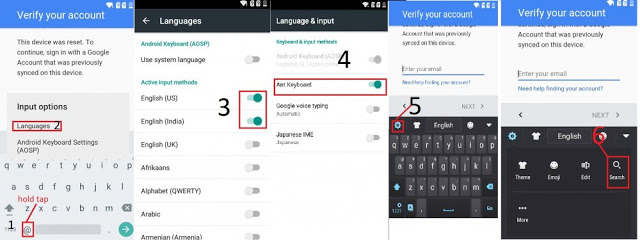
1. Touch Enter Your Email to show keyboard. then press @.
2. Tap on Languages.
3. Select two Language, English US and English India.
4. Go back to keyboard, then tap and hold to display Language & Input and turn on Ant Keyboard.
5. Go back and Tap again Enter Your Email to display keyboard and tap Gear icon6. then tap on Search
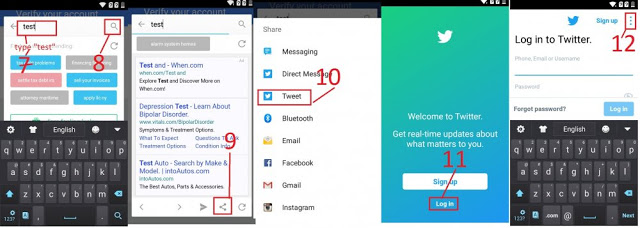
7-8. Type word and tap on search icon.
9. Tap on Share Icon.
10. Select Tweet.
11. Tap Log In.
12. on Upper right, tap the three dot.

13. Then tap on About.
14. Select Terms of Service.
15-16. Highlight text by holding tap on any text, then the Search Icon show again, tap on it.
17-18. Search the word Setting to display the System Settings as you see in the screenshot, tap on it to go to Settings.
19. Now you are in Settings, Scroll down and go to Apps.
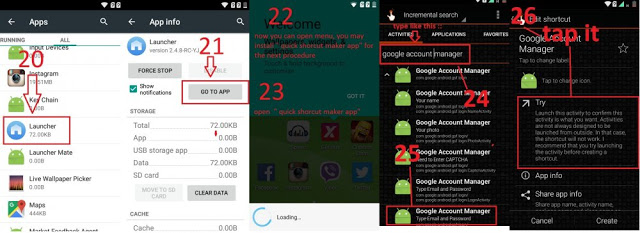
20. Got to tab ALL, scroll down and open Launcher.
21. On App info, Tap GO TO APP button.
22 - 23. Now You can transfer your Quick Shortcut Maker to your phone via USB Cable or SD Card. Install and open Quick Shortcut Maker.
24-25. Search Google Acount Manager, Then tap on Google Account Manager Type Email and Password.
26. Tap on Try.
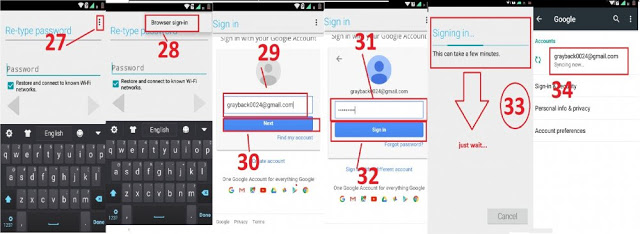
27. Instead of typing a password, tap on three dot on upper right.
28. then tap Browser sign in.
29-30. Now enter your new email, or you can create new. then next.
31-32. Enter Password then sign in.
33. Just wait.
34. boom!, Gmail account verification has been bypassed.
Problem : FRP , Usb problem kaya Bypass na lang muna
First you need the following,
Quick Shortcut Maker 2.4.0
Wifi Connection
USB Connector or SD Card to transfer Quick Shortcut Maker to your phone
Brain
Follow this steps carefully with screenshot Credit and thanks to Azis.
1. Touch Enter Your Email to show keyboard. then press @.
2. Tap on Languages.
3. Select two Language, English US and English India.
4. Go back to keyboard, then tap and hold to display Language & Input and turn on Ant Keyboard.
5. Go back and Tap again Enter Your Email to display keyboard and tap Gear icon6. then tap on Search
7-8. Type word and tap on search icon.
9. Tap on Share Icon.
10. Select Tweet.
11. Tap Log In.
12. on Upper right, tap the three dot.
13. Then tap on About.
14. Select Terms of Service.
15-16. Highlight text by holding tap on any text, then the Search Icon show again, tap on it.
17-18. Search the word Setting to display the System Settings as you see in the screenshot, tap on it to go to Settings.
19. Now you are in Settings, Scroll down and go to Apps.
20. Got to tab ALL, scroll down and open Launcher.
21. On App info, Tap GO TO APP button.
22 - 23. Now You can transfer your Quick Shortcut Maker to your phone via USB Cable or SD Card. Install and open Quick Shortcut Maker.
24-25. Search Google Acount Manager, Then tap on Google Account Manager Type Email and Password.
26. Tap on Try.
27. Instead of typing a password, tap on three dot on upper right.
28. then tap Browser sign in.
29-30. Now enter your new email, or you can create new. then next.
31-32. Enter Password then sign in.
33. Just wait.
34. boom!, Gmail account verification has been bypassed.
