
- Joined
- Mar 11, 2015
- Messages
- 604
- Reaction score
- 15
- Points
- 81
share ko lang,. since wala pa stock rom at hindi paren supported sa cm2 at miracle ang play click,.
flies needed: Firmware
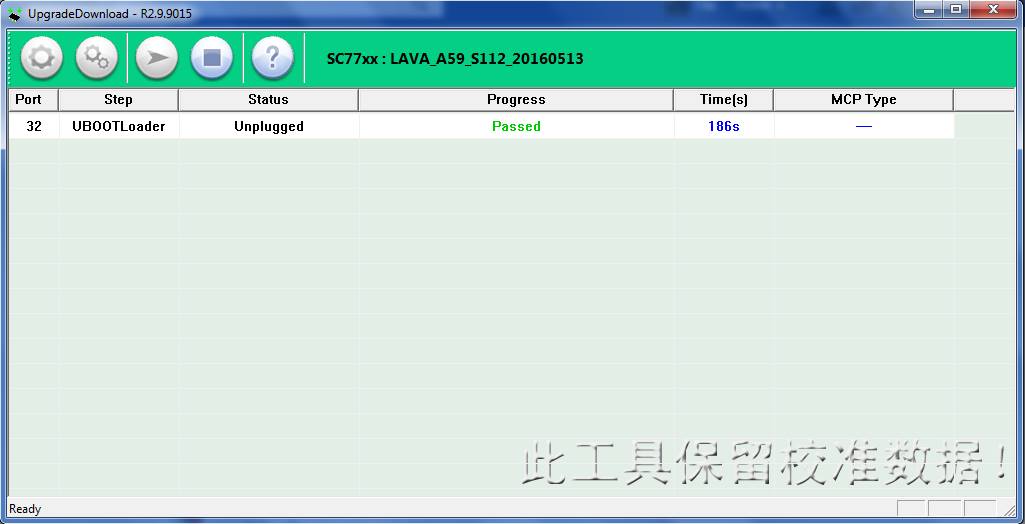
flasher: SPD upgrade tool
1. download lang needed files at extract naren
2. open spd upgrade tool at iload ang firmware
3. press play button the i off play click then hold down volume down then saksak usb
4. wait lang na matapos
5. done,. pera na
6. eto ang dahilan kung bakit may temporary solution sa Thread titile ko,.
a. hindi nagana ang camera NO SOlution pa
b. nagkapalit ang volume up at down No solution pa din
3. hindi nagana ang back home at menu button so mag install nalang nito after flashing Navigation Keys power on yung phone then punta sa settings then about - build number tap 7 times then back then enable usb debugging then install the file using moborobo. after that restart the phone then go to menu again then open the navigation bar app then enable all buttons,.
7. at isa pang bonus nito,. after flashing unlocked naren ang play click naten,.
Photos:


flies needed: Firmware
flasher: SPD upgrade tool
1. download lang needed files at extract naren
2. open spd upgrade tool at iload ang firmware
3. press play button the i off play click then hold down volume down then saksak usb
4. wait lang na matapos
5. done,. pera na
6. eto ang dahilan kung bakit may temporary solution sa Thread titile ko,.
a. hindi nagana ang camera NO SOlution pa
b. nagkapalit ang volume up at down No solution pa din
3. hindi nagana ang back home at menu button so mag install nalang nito after flashing Navigation Keys power on yung phone then punta sa settings then about - build number tap 7 times then back then enable usb debugging then install the file using moborobo. after that restart the phone then go to menu again then open the navigation bar app then enable all buttons,.
7. at isa pang bonus nito,. after flashing unlocked naren ang play click naten,.
Photos:


 )
)

![[ERROR]](/data/avatars/m/2/2671.jpg?1554791320)
