
- Joined
- Jan 26, 2022
- Messages
- 47
- Reaction score
- 91
- Points
- 1
- Location
- Partido, San Jose, Camarines-sur
OK first of all syempre mahilig tayo sa crack software unlocking tools so dun nakukuha ng pc or laptop ang unknown virus
hindi sya actually virus pero nag rurun all the time kahit hindi nman ginagamit,
Sundan maigi hindi lahat ng windows ver ahy gagana
tested ko sa Windows 8.1 Pro
1. Punta ka ng TASK MANAGER and Select START-UP
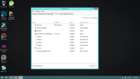
2.hanapin ang nag rurun na software, Example, SVC-HOST at EXPLORER.EXE
right click then DISABLE
3.NOW TRY TO REBOOT OR RESTART YOUR PC,ALPTOP TO SEE CHANGES
hindi sya actually virus pero nag rurun all the time kahit hindi nman ginagamit,
Sundan maigi hindi lahat ng windows ver ahy gagana
tested ko sa Windows 8.1 Pro
1. Punta ka ng TASK MANAGER and Select START-UP
2.hanapin ang nag rurun na software, Example, SVC-HOST at EXPLORER.EXE
right click then DISABLE
3.NOW TRY TO REBOOT OR RESTART YOUR PC,ALPTOP TO SEE CHANGES