Ka ant bka may gusto sainyo nito, mas malupet kesa sa ccleaner
System Ninja Version 3
What is System Ninja?
System Ninja is a fast, powerful and effective system optimization solution for Windows XP, Windows Vista and Windows 7. It’s designed to quickly remove junk files, improve system speed and help fix problems.
Powerful Junk Cleaner
System Ninja’s file scanning engine removes junk files from your computer. It performs a heuristic analysis of every file, identifying what doesn’t belong.
100% Freeware, 100% Safe
System Ninja is provided absolutely free of charge, with no strings attached. It is also 100% free from Virus’s, Malware, Spyware and all that other unwanted junk. We do not package any toolbars with System Ninja, nor do we use it to display ads or popups.

Download Link: System Ninja 3
Plugins
Update: Registry extension
1. Download this file: Click Me
2. Unzip the file then copy the folder inside your system ninja software folder located in C:\Program Files\System Ninja
3. Open system ninja
4. go to system tools
5. additional tools
6. get plugins
7. install the registry cleaner
8. click close tools after installation
Note: Para po sa mga gamers na takot masama ang files nila sa mabubura ng ninja meron po fix dito.
1. Go to system ninja click options
2. click scan exclusion
3. select application ( Kailangan po ito para di mabura ung mga save nyo if ever man nag install kayo sa C: )
Pwede din ung folder ng games nyo i exclude nyo sa scanning
Screenshot
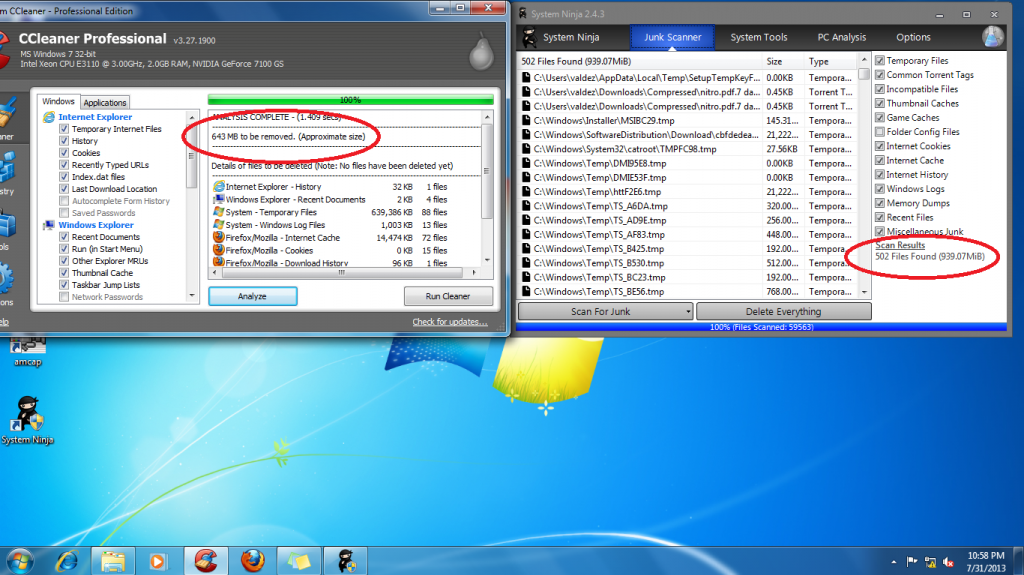
Ccleaner Vs Ninja
Requirements: (Click to download)
Microsoft .NET Framework 3.5
credits to original uploader
System Ninja Version 3
What is System Ninja?
System Ninja is a fast, powerful and effective system optimization solution for Windows XP, Windows Vista and Windows 7. It’s designed to quickly remove junk files, improve system speed and help fix problems.
Powerful Junk Cleaner
System Ninja’s file scanning engine removes junk files from your computer. It performs a heuristic analysis of every file, identifying what doesn’t belong.
100% Freeware, 100% Safe
System Ninja is provided absolutely free of charge, with no strings attached. It is also 100% free from Virus’s, Malware, Spyware and all that other unwanted junk. We do not package any toolbars with System Ninja, nor do we use it to display ads or popups.
Download Link: System Ninja 3
Plugins
Update: Registry extension
1. Download this file: Click Me
2. Unzip the file then copy the folder inside your system ninja software folder located in C:\Program Files\System Ninja
3. Open system ninja
4. go to system tools
5. additional tools
6. get plugins
7. install the registry cleaner
8. click close tools after installation
Note: Para po sa mga gamers na takot masama ang files nila sa mabubura ng ninja meron po fix dito.
1. Go to system ninja click options
2. click scan exclusion
3. select application ( Kailangan po ito para di mabura ung mga save nyo if ever man nag install kayo sa C: )
Pwede din ung folder ng games nyo i exclude nyo sa scanning
Screenshot
Ccleaner Vs Ninja
Requirements: (Click to download)
Microsoft .NET Framework 3.5
credits to original uploader

