
= = => UnpackMe v0.1 FREE For ALL
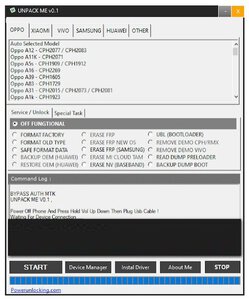
UnpackMe v0.1 is a small tool for windows 10 and 11 operating systems. it is allowed users to bypass auth on MediaTek, flash device, and user lock removes with data or without data loss one click only. the tool also fixes the IMEI issue on the device also you can install needed drivers with one click. this update is free of activation you do not need any key or keygen to open the tool. need only double click on the tool with admin permission in a few seconds tools are executed on your Windows computer.
- Factory Reset
- Safe Format [KEEP DATA] | PARA, MISC
- Authentication Bypass
- Unlock Bootloader
- Relock Bootloader
- Permanently Unlock
- Erase FRP [ALL MTK]
- Samsung FRP [ALL MTK]
- Xiaomi Account Erase [ALL MTK]
- VIVO DEMO Remove [ALL MTK]
- OPPO DEMO Remove [ALL MTK]
- VIVO V23e Demo Remove
- Auth Bypass
- Flash
- Backup NV
- Unlock Bootloader
- Format Data
- Erase NV
- Relock Bootloader
- Erase FRP
- Restore NV
- Restore NV
- Reset MiCloud
- Erase FRP [SAM]
Select item:- Download Only, Erase Flash, Bypass Auth, Manual DA and scatter select
How To Use?
UnpackMe v0.1 is a small tool for windows 10 and 11 operating systems. it is allowed users to bypass auth on MediaTek, flash device, and user lock removes with data or without data loss one click only. the tool also fixes the IMEI issue on the device also you can install needed drivers with one click. this update is free of activation you do not need any key or keygen to open the tool. need only double click on the tool with admin permission in a few seconds tools are executed on your Windows computer.
UnpackMe supported the following brands smartphone:
- Xiaomi
- Samsung
- Huawei
- OPPO
- VIVO
- VSmart
- Asus
- Lenovo
- Infinix
- LG
- Meizu
- Nokia
- More devices were soon added...
- USER LOCK
- Factory Reset
- Safe Format [KEEP DATA] | PARA, MISC
- Authentication Bypass
- Unlock Bootloader
- Relock Bootloader
- Permanently Unlock
- ACCOUNT LOCK
- Erase FRP [ALL MTK]
- Samsung FRP [ALL MTK]
- Xiaomi Account Erase [ALL MTK]
- DEMO LOCK
- VIVO DEMO Remove [ALL MTK]
- OPPO DEMO Remove [ALL MTK]
- VIVO V23e Demo Remove
- MTK Universal
- Auth Bypass
- Flash
- Backup NV
- Unlock Bootloader
- Format Data
- Erase NV
- Relock Bootloader
- Erase FRP
- Restore NV
- Restore NV
- Reset MiCloud
- Erase FRP [SAM]
Select item:- Download Only, Erase Flash, Bypass Auth, Manual DA and scatter select
How To Use?
- First, you need to download the zip file from the below link
- Next, you can unzip all files at c: drive it's very important
- Next, open the folder which you have to extract all files
- Run the "UNPACK_ME_V0.1.EXE"
- Next, you can install all drivers if you already installed skip this step
- Connect the phone and try to do any function
- Enjoy !!!