
- Joined
- Feb 8, 2019
- Messages
- 291
- Reaction score
- 233
- Points
- 1
- Location
- Surigao Del Norte. Surigao City
Vivo V5 [1601] Done NCK 1time
1.Power off your phone
2.Open NCK Tools.. and Sundin ang nasa picture. Set Phone Setting [MT6572_EMMC]
3.then click factory Reboot . pag nafactory reboot muna sya. may lalabas na chinesse word. Piliin ang Emmc then click power button. wait few minutes para succes Wipe Data]
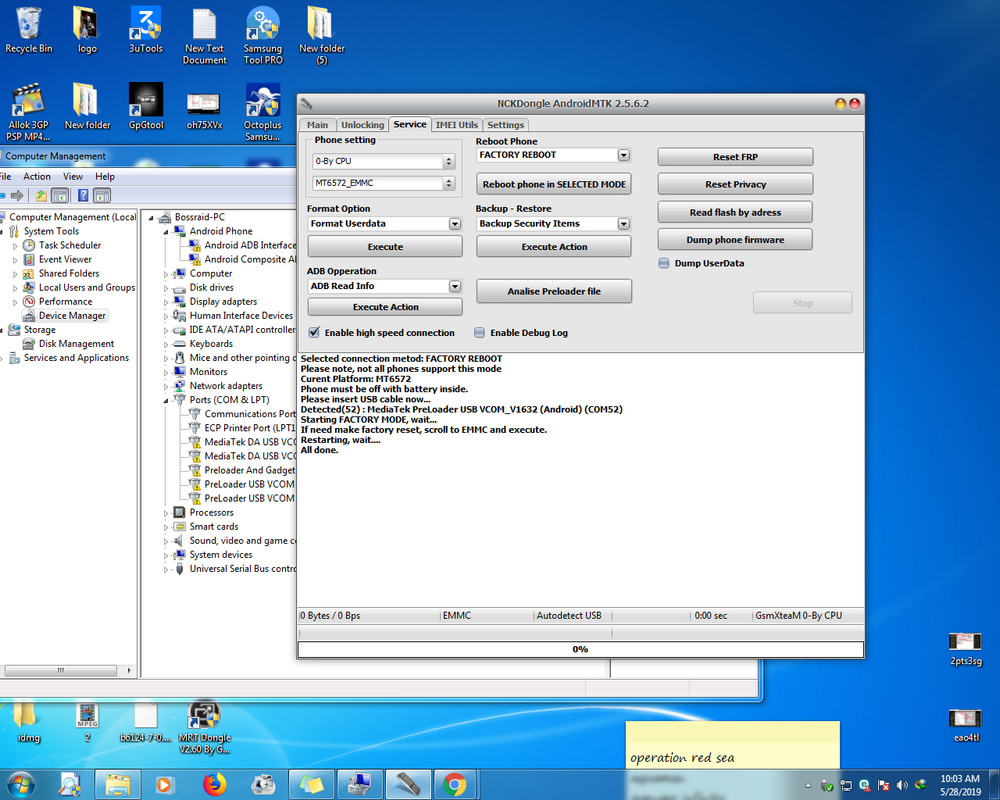
SSssss
Selected connection metod: FACTORY REBOOT
Please note, not all phones support this mode
Curent Platform: MT6572
Phone must be off with battery inside.
Please insert USB cable now...
Detected(52) : MediaTek PreLoader USB VCOM_V1632 (Android) (COM52)
Starting FACTORY MODE, wait...
If need make factory reset, scroll to EMMC and execute.
Restarting, wait....
All done.
1.Power off your phone
2.Open NCK Tools.. and Sundin ang nasa picture. Set Phone Setting [MT6572_EMMC]
3.then click factory Reboot . pag nafactory reboot muna sya. may lalabas na chinesse word. Piliin ang Emmc then click power button. wait few minutes para succes Wipe Data]
SSssss
Selected connection metod: FACTORY REBOOT
Please note, not all phones support this mode
Curent Platform: MT6572
Phone must be off with battery inside.
Please insert USB cable now...
Detected(52) : MediaTek PreLoader USB VCOM_V1632 (Android) (COM52)
Starting FACTORY MODE, wait...
If need make factory reset, scroll to EMMC and execute.
Restarting, wait....
All done.