Good day mga ka AntGSM Team
Share ko lang po ang Bago kung gawa
Unit Status:Share ko lang po ang Bago kung gawa
=> NOT Turning ON, but BATTERY so good;
=> NOT Charging, (Nothing response pag sinalpak ang Charger);
=> NO Battery Logo Display (As in BLACK talaga ang screen);
As the Unit na Hawak ko is ONE of the Supported in Vivo MODEL sa Free Tool na kung tawagin ay ==> ACT_UNLOCK_TOOL V2.0
kaya ginawa ko SAFE FORMAT (PARA) 100% SUCCESS and Hindi naman nabigo at buhay ulit ang UNIT..
HOLD both Vol +, V-kaya ginawa ko SAFE FORMAT (PARA) 100% SUCCESS and Hindi naman nabigo at buhay ulit ang UNIT..
TAPOS salpak usb;
WAIT hanggang matapos within a seconds;
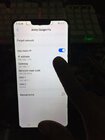
ito sa FRP Remove naman gamit ko via Tricks;
Before bypass FRP, follow these steps.
1. You need to turn on the phone.
2. After that, connect your phone to the Wi-Fi network.
3. Now, Go back to the Wi-Fi network page and click on the arrow.
4. Enable Use Static IP mode and click IP Address.
5. Type any word, tap and hold it, and then select Web Search.
6. Next, Download Quick Shortcut Maker apk.
7. Install and run Quick Shortcut Maker app.
8. Find Settings and click TRY.
9. Next, you need to set a new password for the pattern lock screen.
10. Navigate through the menu items Fingerprints, face, and password >> Screen lock >> Pattern.
11. Draw a new pattern on the screen and click Finish.
12. Finally go back to the home page and draw a lock screen pattern, and click Skip.