"XIAOMI PRO TOOL"
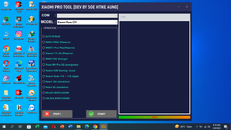
Xiaomi Pro is a development tool developed by Soe Htike Aung which lets users carry out various operations with Xiaomi devices, like bypassing authentication, unlocking and relocking the bootloader, and looking over logs. The tool is compatible with a broad variety of Xiaomi models, including Xiaomi 11T, the Xiaomi 11T Poco C31, Poco F3 GT Gaming, Poco M2 Poco M3 Pro, Poco X3 GT, Redmi 10, Redmi 10X 5G, Redmi 6, Redmi 9, Redmi K30 Ultra, and many other.

DOWNLOAD LINK: https://www.mediafire.com/file/vccxokpfoma3ctb/XIAOMI_PRO_TOOL.rar/file
PASSWORD: Westlee_21
Xiaomi Pro is a development tool developed by Soe Htike Aung which lets users carry out various operations with Xiaomi devices, like bypassing authentication, unlocking and relocking the bootloader, and looking over logs. The tool is compatible with a broad variety of Xiaomi models, including Xiaomi 11T, the Xiaomi 11T Poco C31, Poco F3 GT Gaming, Poco M2 Poco M3 Pro, Poco X3 GT, Redmi 10, Redmi 10X 5G, Redmi 6, Redmi 9, Redmi K30 Ultra, and many other.
DOWNLOAD LINK: https://www.mediafire.com/file/vccxokpfoma3ctb/XIAOMI_PRO_TOOL.rar/file
PASSWORD: Westlee_21
Supported Features:
- Auth bypass,
- RMN11PRo (Pissarro),
- RMN11 Pro Plus (Pissarro),
- Xiaomi 11i 5G (Pissarro),
- RMN115G (Evergo),
- Poco M4 pro 5G (evergreen),
- Redmi K40 Gaming (ares),
- Redmi Note 11E + 11R (light),
- Redmi 10A (dandelion),
- Redmi 9A (dandelion),
- Relock Bootloader
- Unlock Bootloader
Models Supported!!!
- Xiaomi 11T
- Xiaomi Poco C31
- Xiaomi Poco F3 GT Gaming
- Xiaomi Poco M2
- Xiaomi Poco M3 Pro 5G
- Xiaomi Poco X3 GT
- Xiaomi Poco M4 Pro 5G
- Xiaomi Redmi 10 | 10 Prime
- Xiaomi Redmi 10X 5G
- Xiaomi Redmi 10X Pro 5G
- Xiaomi Redmi 6
- Xiaomi Redmi 6A
- Xiaomi Redmi 9
- Xiaomi Redmi 9 Prime
- Xiaomi Redmi 9A / 9T / 9i
- Xiaomi Redmi 9C | PocoPhone C3
- Xiaomi Redmi 9C NFC
- Xiaomi Redmi K30 Ultra
- Xiaomi Redmi K40 Gaming
- Xiaomi Redmi Mi Play
- Xiaomi Redmi Note 10 5G
- Xiaomi Redmi Note 10 Pro 5G
- Xiaomi Redmi Note 10S 4G
- Xiaomi Redmi Note 10T 5G
- Xiaomi Redmi Note 11 4G
- Xiaomi Redmi Note 11 5G
- Xiaomi Redmi Note 115
- Xiaomi Redmi Note 11 Pro
- Xiaomi 11T 5G
- Xiaomi Redmi Note 3 (MTK)
- Xiaomi Redmi Note 4 (MTK)
- Xiaomi Redmi Note 8 2021
- Xiaomi Redmi Note 8 Pro
- Xiaomi Redmi Note 9 | 10X 4G
- Xiaomi Redmi Note 9 5G
- Xiaomi Redmi 10A
- Xiaomi Redmi 10C
How To Use?
- In the beginning, you must get the ZIP file by clicking the following link
- Then, you should remove all files from C: drive ( important)
- Make sure you’ve turned off your antivirus prior to running your installation
- Then you should open the folder and install the setup file following some basic instructions
- Run the “loader .exe.”
- Then, you’ll be able to install all the drivers you have already installed them. You can skip this step
- Connect the phone to the internet and try to accomplish any task
- Enjoy !!!