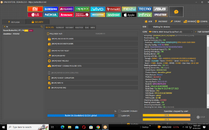
-PROCEDURE
-Open Unlock Tool
1. Click MI
2. Select Security
3. Search Redmi 9A
4. Select Custom emi Redmi 9A [dandelion] 12.0.3.0_global
5. Click [Brom] Reset Disable MI Cloud Ota
6. Insert Usb Cable
7. Hold both power V+ v- release all button if detect on pc
MAY PANG ULAM NA!!! DONE!!


-Open Unlock Tool
1. Click MI
2. Select Security
3. Search Redmi 9A
4. Select Custom emi Redmi 9A [dandelion] 12.0.3.0_global
5. Click [Brom] Reset Disable MI Cloud Ota
6. Insert Usb Cable
7. Hold both power V+ v- release all button if detect on pc
MAY PANG ULAM NA!!! DONE!!