REFERENCE Oppo A3 (PADM00) Hang Logo binugahan ni Hydra

jhin27

Registered
Joined
Jun 14, 2016
Messages
26
Reaction score
63
Points
1
Location
Tuguegarao City, Cagayan
salamat sa Dios
Oppo A3 (PADM00) Hang Logo binugahan ni Hydra

Open folder Hydra Tool/Bin/libusbfilter/install-filter-win
choose Install a device filter, click Next
Press Bootkey (Vol + -) then connect cable
select MTK port then click install, unplug cable

open MTK module
  1. Select Brand: Oppo & Model: Oppo A3 (PADM00)
  2. Click Bootinfo, Press bootkey (Vol + -) then connect cable, release bootkey pag detected na
  3. Click Ultra Power Option
  4. sa method/option choose Rebuild Userdata
  5. click Execute, Done :)
200400003798-HMTKTool-exe-FM-Ultra-Power-Rebuild-Userdata-04-11-2021-085506.jpg

20210411-085846.jpg


Backup Stock Rom
 
salamat sa Dios
Oppo A3 (PADM00) Hang Logo binugahan ni Hydra

Open folder Hydra Tool/Bin/libusbfilter/install-filter-win
choose Install a device filter, click Next
Press Bootkey (Vol + -) then connect cable
select MTK port then click install, unplug cable

open MTK module
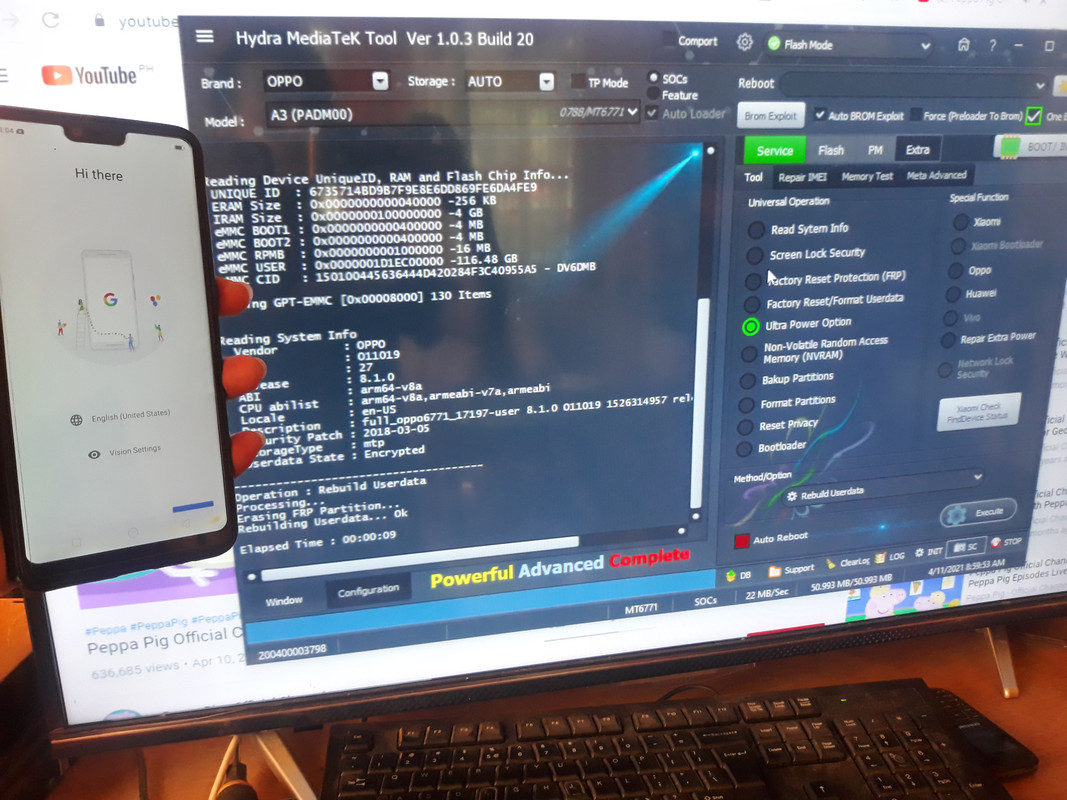
  1. Select Brand: Oppo & Model: Oppo A3 (PADM00)
  2. Click Bootinfo, Press bootkey (Vol + -) then connect cable, release bootkey pag detected na
  3. Click Ultra Power Option
  4. sa method/option choose Rebuild Userdata
  5. click Execute, Done :)
200400003798-HMTKTool-exe-FM-Ultra-Power-Rebuild-Userdata-04-11-2021-085506.jpg

20210411-085846.jpg


Backup Stock Rom
boss diba dilikado ma dedo?..
or kailangan din mai backup thanks
 
Who read this thread (Total readers: 0)
No registered users viewing this thread.
Back
Top