What's new
PinoyTechnician

This is a sample guest message. Register a free account today to become a member! Once signed in, you'll be able to participate on this site by adding your own topics and posts, as well as connect with other members through your own private inbox!

REFERENCE Oppo A3 (PADM00) Hang Logo binugahan ni Hydra

jhin27

Registered
Joined
Jun 14, 2016
Messages
26
Reaction score
63
Points
1
Location
Tuguegarao City, Cagayan
salamat sa Dios
Oppo A3 (PADM00) Hang Logo binugahan ni Hydra

Open folder Hydra Tool/Bin/libusbfilter/install-filter-win
choose Install a device filter, click Next
Press Bootkey (Vol + -) then connect cable
select MTK port then click install, unplug cable

open MTK module
  1. Select Brand: Oppo & Model: Oppo A3 (PADM00)
  2. Click Bootinfo, Press bootkey (Vol + -) then connect cable, release bootkey pag detected na
  3. Click Ultra Power Option
  4. sa method/option choose Rebuild Userdata
  5. click Execute, Done :)
200400003798-HMTKTool-exe-FM-Ultra-Power-Rebuild-Userdata-04-11-2021-085506.jpg

20210411-085846.jpg


Backup Stock Rom
 
salamat sa Dios
Oppo A3 (PADM00) Hang Logo binugahan ni Hydra

Open folder Hydra Tool/Bin/libusbfilter/install-filter-win
choose Install a device filter, click Next
Press Bootkey (Vol + -) then connect cable
select MTK port then click install, unplug cable

open MTK module
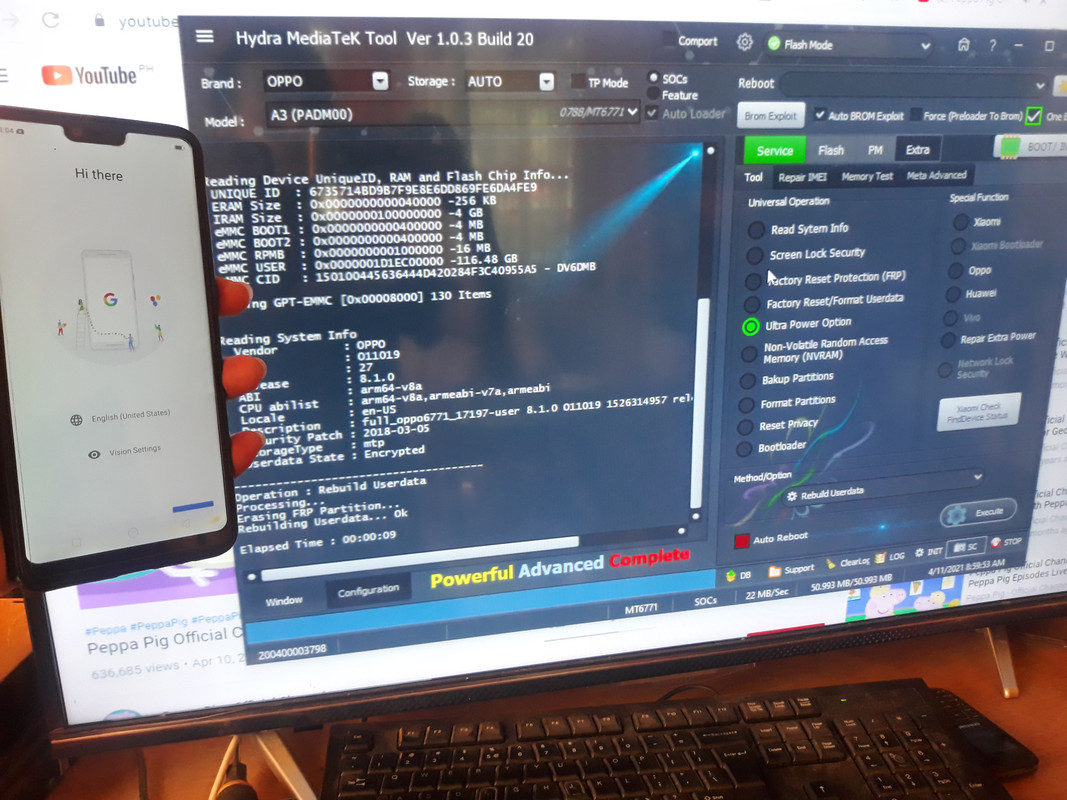
  1. Select Brand: Oppo & Model: Oppo A3 (PADM00)
  2. Click Bootinfo, Press bootkey (Vol + -) then connect cable, release bootkey pag detected na
  3. Click Ultra Power Option
  4. sa method/option choose Rebuild Userdata
  5. click Execute, Done :)
200400003798-HMTKTool-exe-FM-Ultra-Power-Rebuild-Userdata-04-11-2021-085506.jpg

20210411-085846.jpg


Backup Stock Rom
boss diba dilikado ma dedo?..
or kailangan din mai backup thanks
 
Back
Top