
What's new
PinoyTechnician

This is a sample guest message. Register a free account today to become a member! Once signed in, you'll be able to participate on this site by adding your own topics and posts, as well as connect with other members through your own private inbox!

REFERENCE [Odin | UnlockTool] Samsung Galaxy A70 SM-A705MN Remove Password (Latest Security - No Hard Reset) & FRP Bypass

yowzed

Moderator
Staff member
Joined
Sep 27, 2021
Messages
881
Reaction score
784
Points
121
Location
Batangas

Model:​

1695289657623.jpeg
Samsung Galaxy A70 SM-A705MN

Problem:​

Password & FRP - No Recovery Mode kaya hindi pwede i-hard reset manually due to latest security patch. Ang test point ni A70 ay complicated din kaya hangga’t may solution or way sa software ay doon natin papadaanin.

Software Needed:​

Odin & UnlockTool

Solution:​

Since walang hard reset si SM-A705MN, ang naisip kong solution ay mag flash ng stock firmware para ma factory reset.

Flashing Tutorial:​

1. Check the binary version para sa gagamiting firmware. I used UnlockTool para ma check ito.

Boot into Download Mode > Connect to PC > Go to UnlockTool > Samsung > ODIN MODE > [ODIN] Read Info

2. Check the AP. Ang fifth digit from last ay ang binary version na kailangan mo para sa flashing ng stock firmware. (In my case, I need binary 5)

IMG_0590.jpeg

Firmware Used (Binary 5): https://samfw.com/firmware/SM-A705MN/XTC/A705MNXXU5ATA3

3. Extract the downloaded firmware.
4. Boot into Download Mode again and flash the firmware using Odin.

Odin Download Link: https://mega.nz/file/IixwgBwD#DUBbKYvaddwoRlBkBJ9-INmSpB6Y7Ecet6RxJl9qDxs

Wait for the flashing to finish and pagkatapos nyan, automatic naka factory reset na ang A70 mo at FRP naman ang sunod mong gagawin.
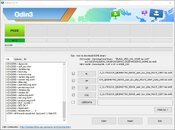
IMG_0587.jpeg

FRP Bypass:​

1. Go to Emergency Call and dial *#0*#
This should pop-up on your screen.
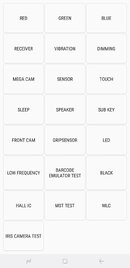
1695291322807.jpeg

2. Balik sa UnlockTool, Punta naman sa FUNCTIONS > [COM] REMOVE FRP [2023] > Method 4 [All]
Allow USB Debugging when prompted and wait for the bypass to finish.

IMG_0588.jpeg

Samsung Galaxy A70 SM-A705MN Password and FRP Latest Security Bypass Done! ✅

Hindi nakapag provide ng pictures ng unit kasi nagmamadali si customer.

More Power PinoyTech!​

1695291822167.png
 

Model:​

View attachment 27204
Samsung Galaxy A70 SM-A705MN

Problem:​

Password & FRP - No Recovery Mode kaya hindi pwede i-hard reset manually due to latest security patch. Ang test point ni A70 ay complicated din kaya hangga’t may solution or way sa software ay doon natin papadaanin.

Software Needed:​

Odin & UnlockTool

Solution:​

Since walang hard reset si SM-A705MN, ang naisip kong solution ay mag flash ng stock firmware para ma factory reset.

Flashing Tutorial:​

1. Check the binary version para sa gagamiting firmware. I used UnlockTool para ma check ito.

Boot into Download Mode > Connect to PC > Go to UnlockTool > Samsung > ODIN MODE > [ODIN] Read Info

2. Check the AP. Ang fifth digit from last ay ang binary version na kailangan mo para sa flashing ng stock firmware. (In my case, I need binary 5)

View attachment 27205

Firmware Used (Binary 5): https://samfw.com/firmware/SM-A705MN/XTC/A705MNXXU5ATA3

3. Extract the downloaded firmware.
4. Boot into Download Mode again and flash the firmware using Odin.

Odin Download Link: https://mega.nz/file/IixwgBwD#DUBbKYvaddwoRlBkBJ9-INmSpB6Y7Ecet6RxJl9qDxs

Wait for the flashing to finish and pagkatapos nyan, automatic naka factory reset na ang A70 mo at FRP naman ang sunod mong gagawin.

View attachment 27206

FRP Bypass:​

1. Go to Emergency Call and dial *#0*#
This should pop-up on your screen.
View attachment 27207

2. Balik sa UnlockTool, Punta naman sa FUNCTIONS > [COM] REMOVE FRP [2023] > Method 4 [All]
Allow USB Debugging when prompted and wait for the bypass to finish.

View attachment 27214

Samsung Galaxy A70 SM-A705MN Password and FRP Latest Security Bypass Done! ✅

Hindi nakapag provide ng pictures ng unit kasi nagmamadali si customer.

More Power PinoyTech!​

problema din boss ayaw mag download mode
 

Model:​

View attachment 27204
Samsung Galaxy A70 SM-A705MN

Problem:​

Password & FRP - No Recovery Mode kaya hindi pwede i-hard reset manually due to latest security patch. Ang test point ni A70 ay complicated din kaya hangga’t may solution or way sa software ay doon natin papadaanin.

Software Needed:​

Odin & UnlockTool

Solution:​

Since walang hard reset si SM-A705MN, ang naisip kong solution ay mag flash ng stock firmware para ma factory reset.

Flashing Tutorial:​

1. Check the binary version para sa gagamiting firmware. I used UnlockTool para ma check ito.

Boot into Download Mode > Connect to PC > Go to UnlockTool > Samsung > ODIN MODE > [ODIN] Read Info

2. Check the AP. Ang fifth digit from last ay ang binary version na kailangan mo para sa flashing ng stock firmware. (In my case, I need binary 5)

View attachment 27205

Firmware Used (Binary 5): https://samfw.com/firmware/SM-A705MN/XTC/A705MNXXU5ATA3

3. Extract the downloaded firmware.
4. Boot into Download Mode again and flash the firmware using Odin.

Odin Download Link: https://mega.nz/file/IixwgBwD#DUBbKYvaddwoRlBkBJ9-INmSpB6Y7Ecet6RxJl9qDxs

Wait for the flashing to finish and pagkatapos nyan, automatic naka factory reset na ang A70 mo at FRP naman ang sunod mong gagawin.

View attachment 27206

FRP Bypass:​

1. Go to Emergency Call and dial *#0*#
This should pop-up on your screen.
View attachment 27207

2. Balik sa UnlockTool, Punta naman sa FUNCTIONS > [COM] REMOVE FRP [2023] > Method 4 [All]
Allow USB Debugging when prompted and wait for the bypass to finish.

View attachment 27214

Samsung Galaxy A70 SM-A705MN Password and FRP Latest Security Bypass Done! ✅

Hindi nakapag provide ng pictures ng unit kasi nagmamadali si customer.

More Power PinoyTech!​

 
Back
Top