What's new
PinoyTechnician

This is a sample guest message. Register a free account today to become a member! Once signed in, you'll be able to participate on this site by adding your own topics and posts, as well as connect with other members through your own private inbox!

PREMIUM [FIX] Tecno Pova Neo Stuck at Fastboot After Flashing

yowzed

Moderator
Staff member
Joined
Sep 27, 2021
Messages
881
Reaction score
784
Points
121
Location
Batangas

Model:​

1694579535620.jpeg
Tecno Pova Neo LE6

Problem:​

Stuck at fastboot mode after flashing.

History:​

Ang unang problem ng phone ay stuck lang sa “dm-verify corruption” kaya hindi magamit ni client.

Gumamit ako ng UnlockTool at ito ang ginawa ko:
(Mediatek Tab - Infinix Tecno Itel Preloader Auth)

IMG_0286.jpeg

1. PERM/UNLOCK BL
2. FORMAT DATA
3. PATCH DM-VERIFY

Nawala ang error na “dm-verify corruption” pero boot loop pa rin sya kaya nag flash ako ng stock firmware.

Firmware Used: https://drive.google.com/file/d/1sUPZgzq2xm5ZAiMgnrpMOyXy5C-mk-U6/view?usp=drivesdk

Afrer flashing, stuck on fastboot mode.

IMG_0285.jpeg

How to fix?​

Common issue ito ng Infinix at Tecno kapag nagfaflash ng stock firmware.

Download and run Minimal ADB & Fastboot: https://androidfilehost.com/?fid=746010030569952951

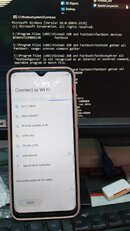
Connect and device sa PC habang naka fastboot mode.

Type the following commands:​
fastboot devices​
fastboot getvar all​
fastboot getvar current-slot​
fastboot —set-active=a​
fastboot reboot​

IMG_0282.jpeg
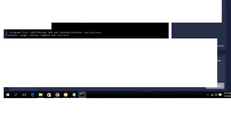
IMG_0283.jpeg

Your device should reboot to normal mode now! Kung may “orange state” na warning ay huwag pansinin at magdidiretso pa rin ng pag boot ang iyong device.


IMG_0280.jpeg

Congratulations! Your Tecno Pova Neo is now fixed!​

More Power PinoyTech!​

1694581214750.png
 
Feedback idol tested sa akin...
 

Attachments

  • IMG_20231018_162338.jpg
    IMG_20231018_162338.jpg
    123.8 KB · Views: 30

Model:​

View attachment 26810
Tecno Pova Neo LE6

Problem:​

Stuck at fastboot mode after flashing.

History:​

Ang unang problem ng phone ay stuck lang sa “dm-verify corruption” kaya hindi magamit ni client.

Gumamit ako ng UnlockTool at ito ang ginawa ko:
(Mediatek Tab - Infinix Tecno Itel Preloader Auth)

View attachment 26813

1. PERM/UNLOCK BL
2. FORMAT DATA
3. PATCH DM-VERIFY

Nawala ang error na “dm-verify corruption” pero boot loop pa rin sya kaya nag flash ako ng stock firmware.

Firmware Used: https://drive.google.com/file/d/1sUPZgzq2xm5ZAiMgnrpMOyXy5C-mk-U6/view?usp=drivesdk

Afrer flashing, stuck on fastboot mode.

View attachment 26811

How to fix?​

Common issue ito ng Infinix at Tecno kapag nagfaflash ng stock firmware.

Download and run Minimal ADB & Fastboot: https://androidfilehost.com/?fid=746010030569952951

Connect and device sa PC habang naka fastboot mode.

Type the following commands:


View attachment 26814
View attachment 26815

Your device should reboot to normal mode now! Kung may “orange state” na warning ay huwag pansinin at magdidiretso pa rin ng pag boot ang iyong device.


View attachment 26816

Congratulations! Your Tecno Pova Neo is now fixed!​

More Power PinoyTech!​

good day master ,dko po ma dl ung link ng firmware, lamat ppo
 
infinix hot 11s procedure applied successfully but still stuck on fastboot mode pa help namn po
 

Model:​

View attachment 26810
Tecno Pova Neo LE6

Problem:​

Stuck at fastboot mode after flashing.

History:​

Ang unang problem ng phone ay stuck lang sa “dm-verify corruption” kaya hindi magamit ni client.

Gumamit ako ng UnlockTool at ito ang ginawa ko:
(Mediatek Tab - Infinix Tecno Itel Preloader Auth)

View attachment 26813

1. PERM/UNLOCK BL
2. FORMAT DATA
3. PATCH DM-VERIFY

Nawala ang error na “dm-verify corruption” pero boot loop pa rin sya kaya nag flash ako ng stock firmware.

Firmware Used: https://drive.google.com/file/d/1sUPZgzq2xm5ZAiMgnrpMOyXy5C-mk-U6/view?usp=drivesdk

Afrer flashing, stuck on fastboot mode.

View attachment 26811

How to fix?​

Common issue ito ng Infinix at Tecno kapag nagfaflash ng stock firmware.

Download and run Minimal ADB & Fastboot: https://androidfilehost.com/?fid=746010030569952951

Connect and device sa PC habang naka fastboot mode.

Type the following commands:


View attachment 26814
View attachment 26815

Your device should reboot to normal mode now! Kung may “orange state” na warning ay huwag pansinin at magdidiretso pa rin ng pag boot ang iyong device.


View attachment 26816

Congratulations! Your Tecno Pova Neo is now fixed!​

More Power PinoyTech!​

master pa bulong poh salamat
 

Model:​

View attachment 26810
Tecno Pova Neo LE6

Problem:​

Stuck at fastboot mode after flashing.

History:​

Ang unang problem ng phone ay stuck lang sa “dm-verify corruption” kaya hindi magamit ni client.

Gumamit ako ng UnlockTool at ito ang ginawa ko:
(Mediatek Tab - Infinix Tecno Itel Preloader Auth)

View attachment 26813

1. PERM/UNLOCK BL
2. FORMAT DATA
3. PATCH DM-VERIFY

Nawala ang error na “dm-verify corruption” pero boot loop pa rin sya kaya nag flash ako ng stock firmware.

Firmware Used: https://drive.google.com/file/d/1sUPZgzq2xm5ZAiMgnrpMOyXy5C-mk-U6/view?usp=drivesdk

Afrer flashing, stuck on fastboot mode.

View attachment 26811

How to fix?​

Common issue ito ng Infinix at Tecno kapag nagfaflash ng stock firmware.

Download and run Minimal ADB & Fastboot: https://androidfilehost.com/?fid=746010030569952951

Connect and device sa PC habang naka fastboot mode.

Type the following commands:


View attachment 26814
View attachment 26815

Your device should reboot to normal mode now! Kung may “orange state” na warning ay huwag pansinin at magdidiretso pa rin ng pag boot ang iyong device.


View attachment 26816

Congratulations! Your Tecno Pova Neo is now fixed!​

More Power PinoyTech!​

salamat idol tested 110percent
 

Model:​

View attachment 26810
Tecno Pova Neo LE6

Problem:​

Stuck at fastboot mode after flashing.

History:​

Ang unang problem ng phone ay stuck lang sa “dm-verify corruption” kaya hindi magamit ni client.

Gumamit ako ng UnlockTool at ito ang ginawa ko:
(Mediatek Tab - Infinix Tecno Itel Preloader Auth)

View attachment 26813

1. PERM/UNLOCK BL
2. FORMAT DATA
3. PATCH DM-VERIFY

Nawala ang error na “dm-verify corruption” pero boot loop pa rin sya kaya nag flash ako ng stock firmware.

Firmware Used: https://drive.google.com/file/d/1sUPZgzq2xm5ZAiMgnrpMOyXy5C-mk-U6/view?usp=drivesdk

Afrer flashing, stuck on fastboot mode.

View attachment 26811

How to fix?​

Common issue ito ng Infinix at Tecno kapag nagfaflash ng stock firmware.

Download and run Minimal ADB & Fastboot: https://androidfilehost.com/?fid=746010030569952951

Connect and device sa PC habang naka fastboot mode.

Type the following commands:


View attachment 26814
View attachment 26815

Your device should reboot to normal mode now! Kung may “orange state” na warning ay huwag pansinin at magdidiretso pa rin ng pag boot ang iyong device.


View attachment 26816

Congratulations! Your Tecno Pova Neo is now fixed!​

More Power PinoyTech!​

pa update ng link dol salamat
 

Model:​

View attachment 26810
Tecno Pova Neo LE6

Problem:​

Stuck at fastboot mode after flashing.

History:​

Ang unang problem ng phone ay stuck lang sa “dm-verify corruption” kaya hindi magamit ni client.

Gumamit ako ng UnlockTool at ito ang ginawa ko:
(Mediatek Tab - Infinix Tecno Itel Preloader Auth)

View attachment 26813

1. PERM/UNLOCK BL
2. FORMAT DATA
3. PATCH DM-VERIFY

Nawala ang error na “dm-verify corruption” pero boot loop pa rin sya kaya nag flash ako ng stock firmware.

Firmware Used: https://drive.google.com/file/d/1sUPZgzq2xm5ZAiMgnrpMOyXy5C-mk-U6/view?usp=drivesdk

Afrer flashing, stuck on fastboot mode.

View attachment 26811

How to fix?​

Common issue ito ng Infinix at Tecno kapag nagfaflash ng stock firmware.

Download and run Minimal ADB & Fastboot: https://androidfilehost.com/?fid=746010030569952951

Connect and device sa PC habang naka fastboot mode.

Type the following commands:


View attachment 26814
View attachment 26815

Your device should reboot to normal mode now! Kung may “orange state” na warning ay huwag pansinin at magdidiretso pa rin ng pag boot ang iyong device.


View attachment 26816

Congratulations! Your Tecno Pova Neo is now fixed!​

More Power PinoyTech!​

galing lupit mo lods..
nice one lods..
good job..
malaking tulng po ito sa baguhan...
salamat po lods sa pag bahagi..
 
Back
Top