What's new
PinoyTechnician

This is a sample guest message. Register a free account today to become a member! Once signed in, you'll be able to participate on this site by adding your own topics and posts, as well as connect with other members through your own private inbox!

REFERENCE Redmi 5 plus MI account Removal 100% tested!

archfix12

Expired Account
Joined
Mar 24, 2016
Messages
79
Reaction score
4
Points
201
Location
Ayala Malls Southpark 2nd Floor Telecom Centre
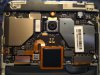
red mi 5 plus test point.jpg

1st Jumper Test point see Photo for reference.

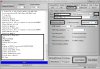
Open Miracle Thunder Box 2.82

redmi 5 plus mi account.JPG


Tick a Qualcomm section see no.1
select Brand Xiaomi see no. 2
select model Redmi 5 Plus see no.3
Tick MI Account unlock see no.4
Select Redmi 5 Plus see no.5
Hold Volume down then connect micro usb to Redmi 5 Plus
Make sure to install USB driver for Qualcomm Devices
Tick Port Button to Detect the Device see no.6
(Qualcomm HS-USB QD Loader)

Click Start Button to start he Process.


Wait until Done.


1,500.00 PHP
 

Attachments

  • red mi 5 plus test point.jpg
    red mi 5 plus test point.jpg
    118.2 KB · Views: 5
  • redmi 5 plus mi account.JPG
    redmi 5 plus mi account.JPG
    179.8 KB · Views: 6
Back
Top