- Joined
- Mar 24, 2016
- Messages
- 79
- Reaction score
- 4
- Points
- 201
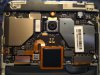
1st Jumper Test point see Photo for reference.
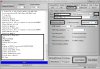
Open Miracle Thunder Box 2.82
Tick a Qualcomm section see no.1
select Brand Xiaomi see no. 2
select model Redmi 5 Plus see no.3
Tick MI Account unlock see no.4
Select Redmi 5 Plus see no.5
Hold Volume down then connect micro usb to Redmi 5 Plus
Make sure to install USB driver for Qualcomm Devices
Tick Port Button to Detect the Device see no.6
(Qualcomm HS-USB QD Loader)
Click Start Button to start he Process.
Wait until Done.
1,500.00 PHP