
RG59 Siamese Coax Cable Wiring Guide
for Analog CCTV Cameras & HD Security Cameras (HD-TVI, AHD, HD-SDI, HD-CVI)
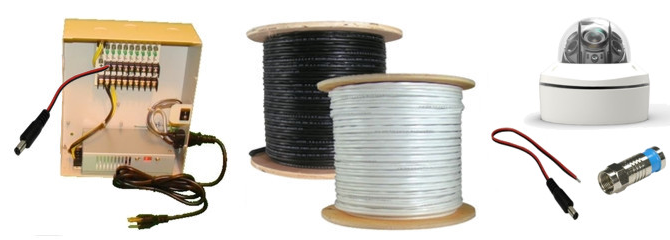
This guide will educate professional and DIY installers on techniques for wiring CCTV cameras and video surveillance systems using spools of RG59 Siamese coax cable. This guide applies to security cameras that use coax cable to transmit video to DVRs and monitors. This includes analog CCTV cameras and the following HD security camera types: HD-TVI, AHD, HD-SDI, HD-CVI.
We also have this guide on how-to wire a security camera system using pre-made Siamese cables. The following topics will be discussed in this article.
What is RG59 Siamese cable?
How-to attach BNC connectors
Using RG59 cable with 12V DC cameras
Using RG59 cable with 24VAC or dual voltage cameras
Using RG59 cable with a power supply box
Using RG59 cable with individual power transformers
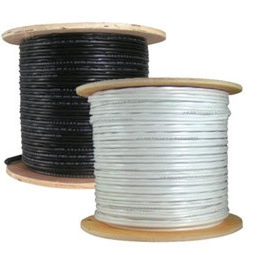
One of the best cable options for video over coax type surveillance cameras is to use spools of RG59 Siamese cable. This allows the installer to cut the cable to the exact length needed, but requires that the BNC connectors be attached to the cable. CCTV Camera Pros has 500 and 1000 foot spools available. Complete packages are also available that include BNC connectors, cutting tool, and crimping tools. You can find RG59 cable & complete wiring packages including installations tools here.
What is Siamese coax cable?
RG59 Siamese cable is a heavily shielded cable which contains an RG59 COAX cable for video and pair of 18 gauge 2 conductor power wires in one jacket. The advantages to using RG59 cable for CCTV camera installation is that it is more durable than most pre-made camera cables and can be run in long distances without interference. You can also cut each cable run to the exact length that you need which makes the cabling part of the installation neat.
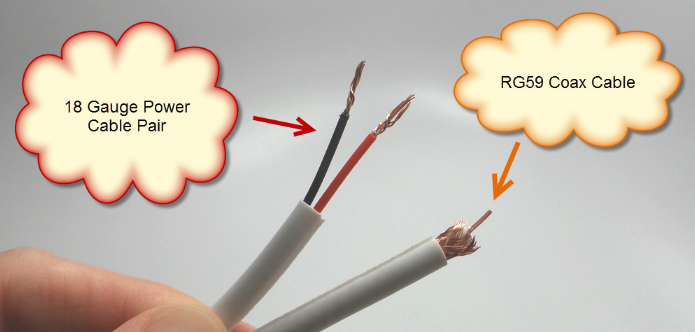
The above picture shows a close-up of RG59 cable
How-to Attach BNC Connectors
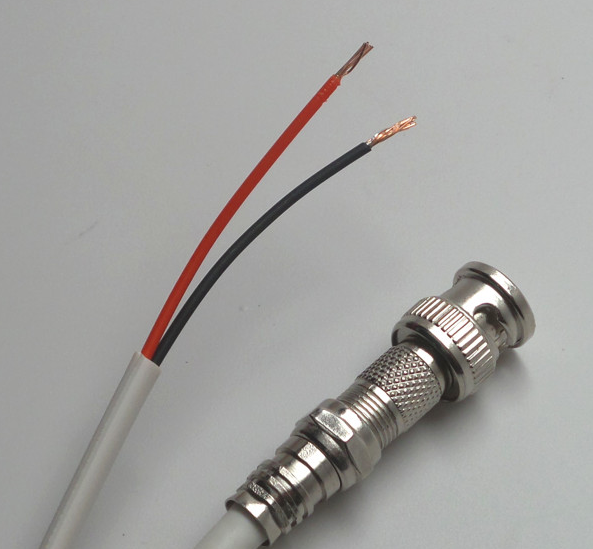
CCTV cameras (analog and HD types) and the surveillance DVRs that they connect to use BNC connectors for video input / output. CCTV cameras always have a BNC female as their video output and CCTV and HD surveillance DVRs almost always have a BNC female inputs for each video channel. This means that the installer must attach a BNC male connector to each end of the RG59 cable run.
The above picture shows
 https://banks-nearme.com/santander-bank-near-me
Using RG59 Siamese Cable with 12V DC Cameras
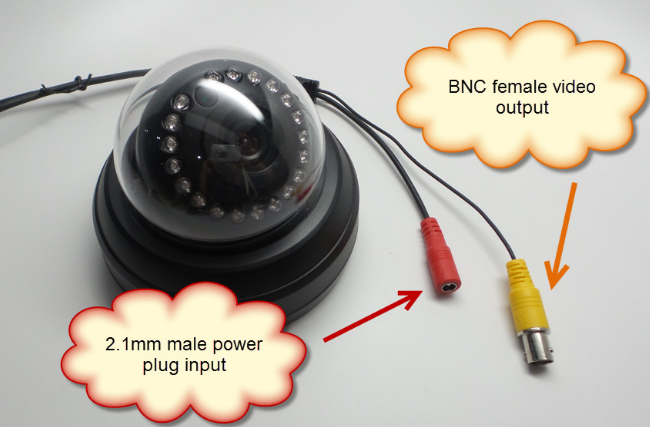
Most 12V DC security cameras (analog CCTV and high definition) have a 2.1mm DC power plug (male) connected to the power input of the camera. If you are using a 24VAC powered camera, dual voltage camera, or any camera that has a wire terminal block to connect power,
 https://banks-nearme.com/suntrust-bank-near-me
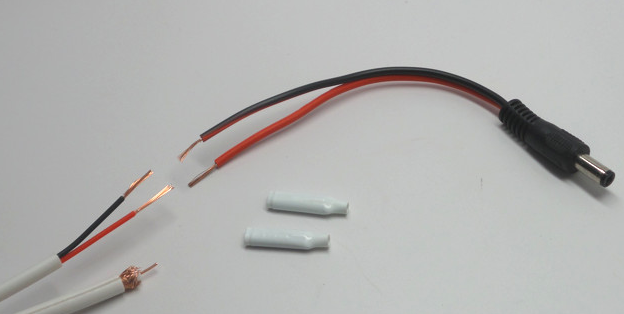
To connect the 18/2 power portion of the RG59 Siamese cable to a camera with a 2.1mm power plug, you must attach
 https://forensicanthropologist.net/salary
Butt connectors, B connectors, or another wire connector type of the installer's choice can be used to attach the 18 gauge power cables to the power lead.
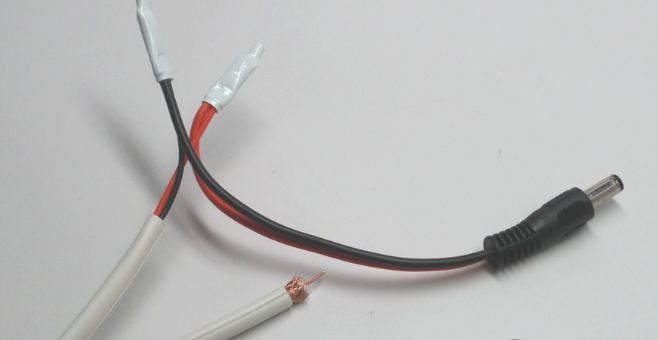
This images shows the cable with a DC power lead attached using B connectors.
Using RG59 Cable with 24VAC or Dual Voltage Cameras
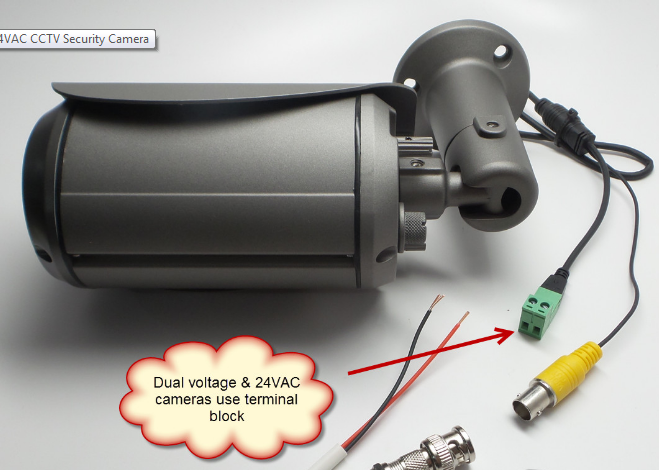
Most dual voltage security cameras (ones that can use a 12V DC or 24VAC power supply) do not have a 2.1mm plug attached to their power cable. Above is a dual voltage 1080p HD CCTV camera. Notice the power terminal block that is used instead of a 2.1mm power plug. The 18/2 power cables of the RG59 Siamese can attach directly to this terminal block by inserting into the slots, then securing the cable with screws.
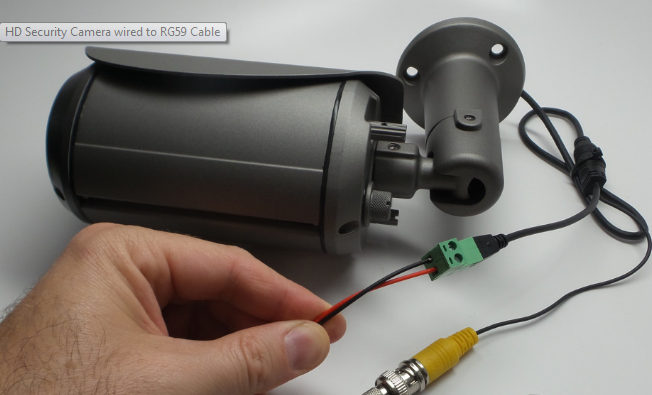
This is what it looks like with the 18/2 cable attached to the power terminal block of the security camera.
The above wiring diagram shows how a dual voltage camera can be wired using pre-made Siamese cables.
Using RG59 Cable with a Multi-Camera Power Supply Box
Multi-camera power supply boxes are used to centralize the power for video surveillance systems. If you are using individual power transformers to power your cameras, please refer to the how-to use individual power supplies with RG59 cable section of this guide.
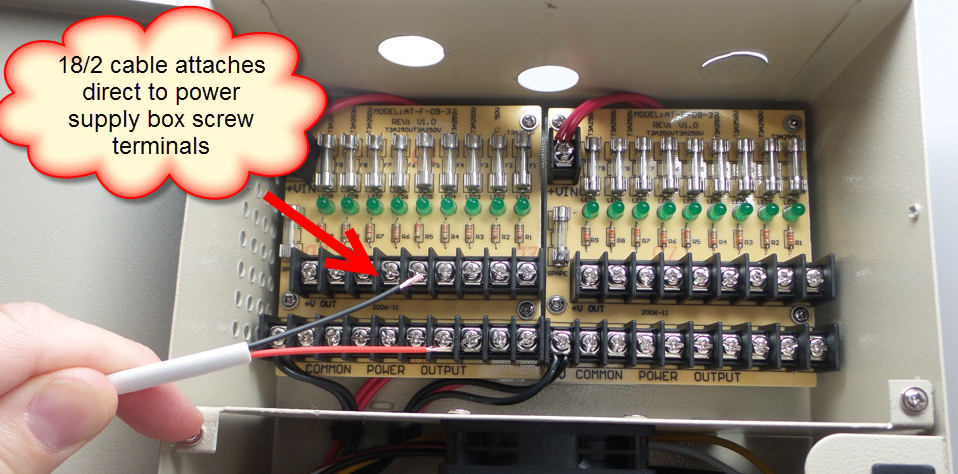
Surveillance System Install - 12V DC Camera and Power Supply Box
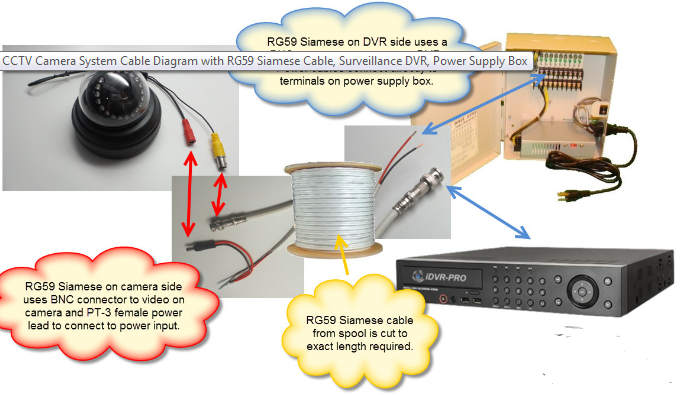
Here is a complete CCTV camera system cable diagram that uses a RG59 cable, a 1080p HD surveillance camera (12V DC powered), a hybrid HD / analog CCTV DVR, and a 12V DC multi-camera power distribution box.
The RG59 Siamese cable is cut to the exact length required.
On the camera side of the cable, a BNC connector is attached to the RG59 coax and a PT-3 power lead is attached to the 18/2 power cable.
On the DVR side, a BNC connector allows the coax cable to connect to the video input of the DVR and the raw 18/2 power wire connects directly to one of the ports on the power supply box.
These steps are repeated for each 12V DC camera that your system uses.
credits to original poster..
for Analog CCTV Cameras & HD Security Cameras (HD-TVI, AHD, HD-SDI, HD-CVI)
This guide will educate professional and DIY installers on techniques for wiring CCTV cameras and video surveillance systems using spools of RG59 Siamese coax cable. This guide applies to security cameras that use coax cable to transmit video to DVRs and monitors. This includes analog CCTV cameras and the following HD security camera types: HD-TVI, AHD, HD-SDI, HD-CVI.
We also have this guide on how-to wire a security camera system using pre-made Siamese cables. The following topics will be discussed in this article.
What is RG59 Siamese cable?
How-to attach BNC connectors
Using RG59 cable with 12V DC cameras
Using RG59 cable with 24VAC or dual voltage cameras
Using RG59 cable with a power supply box
Using RG59 cable with individual power transformers
One of the best cable options for video over coax type surveillance cameras is to use spools of RG59 Siamese cable. This allows the installer to cut the cable to the exact length needed, but requires that the BNC connectors be attached to the cable. CCTV Camera Pros has 500 and 1000 foot spools available. Complete packages are also available that include BNC connectors, cutting tool, and crimping tools. You can find RG59 cable & complete wiring packages including installations tools here.
What is Siamese coax cable?
RG59 Siamese cable is a heavily shielded cable which contains an RG59 COAX cable for video and pair of 18 gauge 2 conductor power wires in one jacket. The advantages to using RG59 cable for CCTV camera installation is that it is more durable than most pre-made camera cables and can be run in long distances without interference. You can also cut each cable run to the exact length that you need which makes the cabling part of the installation neat.
The above picture shows a close-up of RG59 cable
How-to Attach BNC Connectors
CCTV cameras (analog and HD types) and the surveillance DVRs that they connect to use BNC connectors for video input / output. CCTV cameras always have a BNC female as their video output and CCTV and HD surveillance DVRs almost always have a BNC female inputs for each video channel. This means that the installer must attach a BNC male connector to each end of the RG59 cable run.
The above picture shows
https://banks-nearme.com/santander-bank-near-meUsing RG59 Siamese Cable with 12V DC Cameras
Most 12V DC security cameras (analog CCTV and high definition) have a 2.1mm DC power plug (male) connected to the power input of the camera. If you are using a 24VAC powered camera, dual voltage camera, or any camera that has a wire terminal block to connect power,
https://banks-nearme.com/suntrust-bank-near-meTo connect the 18/2 power portion of the RG59 Siamese cable to a camera with a 2.1mm power plug, you must attach
https://forensicanthropologist.net/salaryButt connectors, B connectors, or another wire connector type of the installer's choice can be used to attach the 18 gauge power cables to the power lead.
This images shows the cable with a DC power lead attached using B connectors.
Using RG59 Cable with 24VAC or Dual Voltage Cameras
Most dual voltage security cameras (ones that can use a 12V DC or 24VAC power supply) do not have a 2.1mm plug attached to their power cable. Above is a dual voltage 1080p HD CCTV camera. Notice the power terminal block that is used instead of a 2.1mm power plug. The 18/2 power cables of the RG59 Siamese can attach directly to this terminal block by inserting into the slots, then securing the cable with screws.
This is what it looks like with the 18/2 cable attached to the power terminal block of the security camera.
The above wiring diagram shows how a dual voltage camera can be wired using pre-made Siamese cables.
Using RG59 Cable with a Multi-Camera Power Supply Box
Multi-camera power supply boxes are used to centralize the power for video surveillance systems. If you are using individual power transformers to power your cameras, please refer to the how-to use individual power supplies with RG59 cable section of this guide.
Surveillance System Install - 12V DC Camera and Power Supply Box
Here is a complete CCTV camera system cable diagram that uses a RG59 cable, a 1080p HD surveillance camera (12V DC powered), a hybrid HD / analog CCTV DVR, and a 12V DC multi-camera power distribution box.
The RG59 Siamese cable is cut to the exact length required.
On the camera side of the cable, a BNC connector is attached to the RG59 coax and a PT-3 power lead is attached to the 18/2 power cable.
On the DVR side, a BNC connector allows the coax cable to connect to the video input of the DVR and the raw 18/2 power wire connects directly to one of the ports on the power supply box.
These steps are repeated for each 12V DC camera that your system uses.
credits to original poster..