
UNLOCK INSTRUCTIONS:
Direct unlock:
Phone must be rooted!
If the software can't root the phone automatically,
then you must root your device manually.
1. Power on the phone.
2. Tap 7 times on 'Build number' in 'Settings'-'About phone' to enable 'Developer options',
go to 'Settings'-'Developer options' and enable 'USB debugging'.
3. Connect the phone to PC with USB cable, install drivers if needed.
4. Select device in ADB settings.
5. Press 'Unlock' button and select 'New Unlock' for direct unlock.
To read security codes (without root permissions):
1. Power on the phone.
2. Tap 7 times on 'Build number' in 'Settings'-'About phone' to enable 'Developer options',
go to 'Settings'-'Developer options' and enable 'USB debugging'.
3. Connect the phone to PC with USB cable, install drivers if needed.
4. Select device in ADB settings.
5. Press 'Read codes' button to read security codes.
To reset Google account activation lock:
1. ADB must be activated in any way (you can flash sBoot from combination firmware,
make sure, that you are not upgrade sBoot).
2. Connect the phone to PC with USB cable, install drivers if needed.
3. Select device in ADB settings.
4. Press 'Reset FRP' and follow the instructions in program.
5. When process done, press 'Back' on phone and perform factory reset from phone settings.
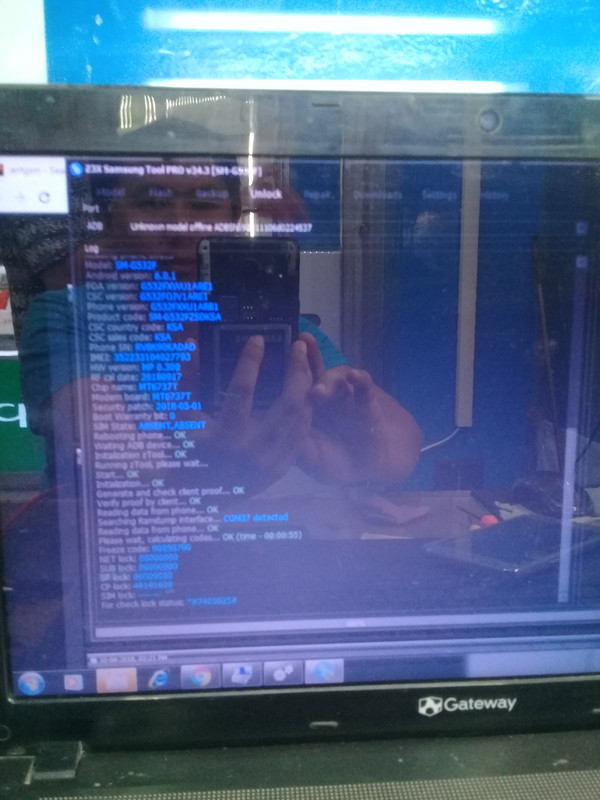
Operation: Read Codes
Selected model: SM-G532F
Software version: 34.3
Checking hash file... OK
Waiting ADB device... OK
Reading phone info...
Model: SM-G532F
Android version: 6.0.1
PDA version: G532FXWU1ARE1
CSC version: G532FOJV1ARE1
Phone version: G532FXXU1ARB1
Product code: SM-G532FZSDKSA
CSC country code: KSA
CSC sales code: KSA
Phone SN: RV8K90KADAD
IMEI: 352233104027793
HW version: MP 0.300
RF cal date: 20180917
Chip name: MT6737T
Modem board: MT6737T
Security patch: 2018-05-01
Boot Warranty bit: 0
SIM State: ABSENT,ABSENT
Rebooting phone... OK
Waiting ADB device... OK
Initialization zTool... OK
Running zTool, please wait...
Start... OK
Initialization... OK
Generate and check client proof... OK
Verify proof by client... OK
Reading data from phone... OK
Searching Ramdump interface... COM37 detected
Reading data from phone... OK
Please wait, calculating codes... OK (time - 00:00:55)
Freeze code: 90850790
NET lock: 00000000
SUB lock: 00000000
SP lock: 00000000
CP lock: 46191620
SIM lock: --------
For check lock status: *#7465625#
Done with Samsung Tool PRO v.34.3
 forensics salary 2016
Direct unlock:
Phone must be rooted!
If the software can't root the phone automatically,
then you must root your device manually.
1. Power on the phone.
2. Tap 7 times on 'Build number' in 'Settings'-'About phone' to enable 'Developer options',
go to 'Settings'-'Developer options' and enable 'USB debugging'.
3. Connect the phone to PC with USB cable, install drivers if needed.
4. Select device in ADB settings.
5. Press 'Unlock' button and select 'New Unlock' for direct unlock.
To read security codes (without root permissions):
1. Power on the phone.
2. Tap 7 times on 'Build number' in 'Settings'-'About phone' to enable 'Developer options',
go to 'Settings'-'Developer options' and enable 'USB debugging'.
3. Connect the phone to PC with USB cable, install drivers if needed.
4. Select device in ADB settings.
5. Press 'Read codes' button to read security codes.
To reset Google account activation lock:
1. ADB must be activated in any way (you can flash sBoot from combination firmware,
make sure, that you are not upgrade sBoot).
2. Connect the phone to PC with USB cable, install drivers if needed.
3. Select device in ADB settings.
4. Press 'Reset FRP' and follow the instructions in program.
5. When process done, press 'Back' on phone and perform factory reset from phone settings.
Operation: Read Codes
Selected model: SM-G532F
Software version: 34.3
Checking hash file... OK
Waiting ADB device... OK
Reading phone info...
Model: SM-G532F
Android version: 6.0.1
PDA version: G532FXWU1ARE1
CSC version: G532FOJV1ARE1
Phone version: G532FXXU1ARB1
Product code: SM-G532FZSDKSA
CSC country code: KSA
CSC sales code: KSA
Phone SN: RV8K90KADAD
IMEI: 352233104027793
HW version: MP 0.300
RF cal date: 20180917
Chip name: MT6737T
Modem board: MT6737T
Security patch: 2018-05-01
Boot Warranty bit: 0
SIM State: ABSENT,ABSENT
Rebooting phone... OK
Waiting ADB device... OK
Initialization zTool... OK
Running zTool, please wait...
Start... OK
Initialization... OK
Generate and check client proof... OK
Verify proof by client... OK
Reading data from phone... OK
Searching Ramdump interface... COM37 detected
Reading data from phone... OK
Please wait, calculating codes... OK (time - 00:00:55)
Freeze code: 90850790
NET lock: 00000000
SUB lock: 00000000
SP lock: 00000000
CP lock: 46191620
SIM lock: --------
For check lock status: *#7465625#
Done with Samsung Tool PRO v.34.3
forensics salary 2016